

Tired of Filevine’s clunky workflow?
Endless clicks and confusing menus slow you down every day, while limited search and rocky integrations make managing case files feel like a battle.
This constant struggle means your firm’s productivity takes a real hit and cases move slower than they should.
The longer you stick with these frustrations, the more time, money, and staff energy you waste chasing fixes and workarounds that just shouldn’t be necessary. That doesn’t just slow down your day—it chips away at team morale and your bottom line, which is why so many legal professionals are ready to move on.

Luckily, there are top-notch alternatives that deliver smarter, more intuitive solutions for legal document management.
In this article, I’ll show you the best Filevine alternatives legal firms can trust in 2025, including Clio, FileCenter, iManage, and more, so you can finally streamline your workflows the way you want.
Find a tool that’s easier, faster, and designed for the way you practice.
Let’s find your solution.
Quick Summary:
| # | Alternative | Rating | Best For |
|---|---|---|---|
| 1 | FileCenter → | Users wanting modern interfaces | |
| 2 | Clio → | Teams needing better collaboration | |
| 3 | iManage → | Companies requiring better support | |
| 4 | LexWorkplace → | Small teams seeking simplicity | |
| 5 | NetDocuments → | Budget-conscious growing businesses |
1. FileCenter

Feeling bogged down by Filevine’s complex interface?
FileCenter offers intuitive cabinet-drawer filing and advanced desktop integration, so your team avoids Filevine’s custom fields and web-only workflow frustrations right from day one.
Unlike Filevine, FileCenter makes it easy for you to get started with visual cabinet-drawer organization that mirrors your real-world filing. This means less training, fewer errors, and a gentler learning curve for your entire firm.
You no longer have to sacrifice productivity to switch.
FileCenter genuinely streamlines legal document workflows as a Filevine alternative by keeping everything organized within a familiar Windows interface. This makes onboarding smoother and minimizes workflow disruption if you’re worried about switching headaches.
Here’s how it delivers in daily legal practice: You use advanced OCR and smart scanning to digitize and organize physical files instantly, solving one of Filevine’s most persistent pain points. Complex upload processes and clunky search become things of the past once your legacy case files are searchable and retrievable.
Additionally, you can open, edit, and save documents directly from Word, Excel, or Outlook—right into FileCenter’s organized cabinet structure. Together, this synergy boosts efficiency and keeps critical files exactly where legal teams need them.
Switching brings peace of mind.
Key features:
- Intuitive digital cabinet-drawer file structure organizes case files in a familiar way, making the transition smoother and faster compared to Filevine’s more technical custom fields.
- Advanced OCR and intelligent scanning automation converts scanned documents into searchable PDFs with automatic file naming, surpassing Filevine’s limited upload-only approach for digitization.
- Direct integration with Microsoft Office apps allows you to work on legal documents natively and save them right into structured folders, streamlining your daily workflow beyond what Filevine’s web interface supports.
Verdict: If you crave a less-distracting document management solution built for legal firms, FileCenter is a smart Filevine alternative. Legal teams cutting document retrieval time by up to 40% and reducing misfiled documents by 30% find that FileCenter’s cabinet-drawer structure and OCR automation deliver the efficient, desktop-friendly experience that Filevine users wish for.
2. Clio

Tired of Filevine’s confusing document management experience?
Clio tackles this by centralizing your legal documents with intuitive organization, robust version control, quick document generation, and a powerful search—all in one user-friendly dashboard.
Unlike Filevine, Clio gives your team integrated features that are both easy to use and powerful, streamlining daily legal workflows instead of bogging you down with clunky menus and limited integrations.
You deserve a solution that just works better.
Clio becomes your document nerve center, so you spend less time tracking files and more time helping clients.
Here’s how you get ahead with Clio when moving away from Filevine’s constraints. Its robust document management tools let you organize, search, and share case files in seconds, eliminating bottlenecks that slow down your current system.
Additionally, Clio’s secure client portal lets you exchange messages, share files, and update clients without relying on external tools. If you’re worried about integrations, Clio connects to over 250 popular legal and business apps, making your switch flexible and future-proof.
The result? More time for billable work, less stress around file management.
Key features:
- Centralized document management with version control lets you store, track, and organize all your legal files by case, so your team always accesses the right version without confusion.
- Integrated secure client portal elevates client collaboration, giving your clients real-time access to documents and communications—beyond what Filevine typically offers for client interaction.
- Broad app integration ecosystem allows you to customize your workflow by connecting Clio with over 250 apps, empowering your firm beyond Filevine’s limited integration flexibility.
Verdict: Clio is a compelling Filevine alternative for legal firms craving simplicity and control in document management. Clio users save an average of 8 hours every week—meaning a real jump in efficiency and revenue—while enjoying better user experience, flexible integrations, and enhanced client engagement.
3. iManage

Feeling boxed in by Filevine’s limited document search?
iManage brings AI-powered search and native Microsoft Office integration to the table, directly tackling the frustrations many legal professionals have with Filevine’s interface and workflow obstacles.
The real differentiator is that iManage offers enterprise-grade security and automated compliance tools that simply go beyond Filevine’s basic document controls. This means worries about regulatory risk and privacy in your practice get addressed right out of the box, not patched on later.
You need a solution that truly fits legal workflows.
iManage doesn’t just organize your firm’s files differently; it totally transforms the search, security, and daily document touchpoints you experience versus Filevine.
The system’s AI-driven search sorts through huge data libraries at lightning speed—letting you surface relevant contracts, emails, and historical matter documents in seconds instead of spending precious billable hours wrestling with clunky filters. You gain this critical advantage with virtually zero learning curve, especially if your team already uses Microsoft Office every day.
Additionally, iManage’s advanced information governance features automate data privacy, compliance, and ethical wall enforcement—three hurdles Filevine users often report as sticking points. By layering in more robust security and regulatory control with deep Microsoft Office integration, iManage directly supports your daily routines without forcing tedious context switching.
The result is a workflow where knowledge retrieval, secure collaboration, and compliance are all amplified—eliminating many of the headaches that drove you to seek a Filevine alternative.
Key features:
- AI-powered document and email search instantly finds relevant legal files, clauses, and communications across vast data sets—outperforming Filevine for matters with massive document volumes.
- Automated information governance and compliance tools handle privacy policies and ethical walls, which addresses complex regulatory environments much more efficiently than Filevine’s basic controls.
- Deep Microsoft Office integration inside Outlook and Word means you can manage, edit, and save documents without leaving familiar tools, slashing workflow friction and training time.
Verdict: iManage stands out as a Filevine alternative made for legal firms managing large, sensitive workloads. One global law firm cut conflicts checks from days to seconds using iManage, instantly unlocking staff time for higher-value tasks—especially where security, search, and Office integration matter most.
4. LexWorkplace

Feel like Filevine just isn’t intuitive enough?
LexWorkplace solves a major Filevine pain point with its matter-centric organization, letting you manage all documents, emails, and notes by client and matter—so nothing gets lost.
If you’re tired of scattered files and weak search in Filevine, LexWorkplace offers a dedicated legal-centric structure that lets you find anything instantly. This matter-based approach means every case file, email, and attachment is always in the right spot.
Email management can also be a key frustration. LexWorkplace makes that easier.
Here’s how it improves your legal workflow.
LexWorkPlace delivers a clean user interface built specifically for legal professionals who want control over their case files without the confusion of an all-in-one suite like Filevine.
With robust integrated email management, you can save every client message into the right matter file instead of juggling attachments and missed details. If you’re handling critical documents, its advanced document compare highlights changes and redlines, allowing you to review contracts or agreements with total confidence.
Plus, powerful search and matter-centric filing cut down on time spent hunting for information, so you can actually focus on your clients.
Switching to LexWorkplace gives your team clarity fast.
Key features:
- Matter-centric document and email organization lets you sort, file, and search every file, note, and email by case, streamlining workflows and providing structure Filevine can’t always match.
- Integrated email management tied to matters automatically saves client correspondence directly within related legal files, strengthening documentation without requiring manual uploads or external plugins.
- Advanced side-by-side document compare empowers paralegals and attorneys to instantly spot edits and version differences, reducing review time by up to 90% for document-intensive work.
Verdict: LexWorkplace is a strong Filevine alternative if your law firm wants less clutter and more productivity from document management software for legal firms. Many attorneys save 25 hours per month and cut document review time by 90%, getting more from every billable hour without workflow disruption.
5. NetDocuments
Overwhelmed by Filevine’s clunky interface?
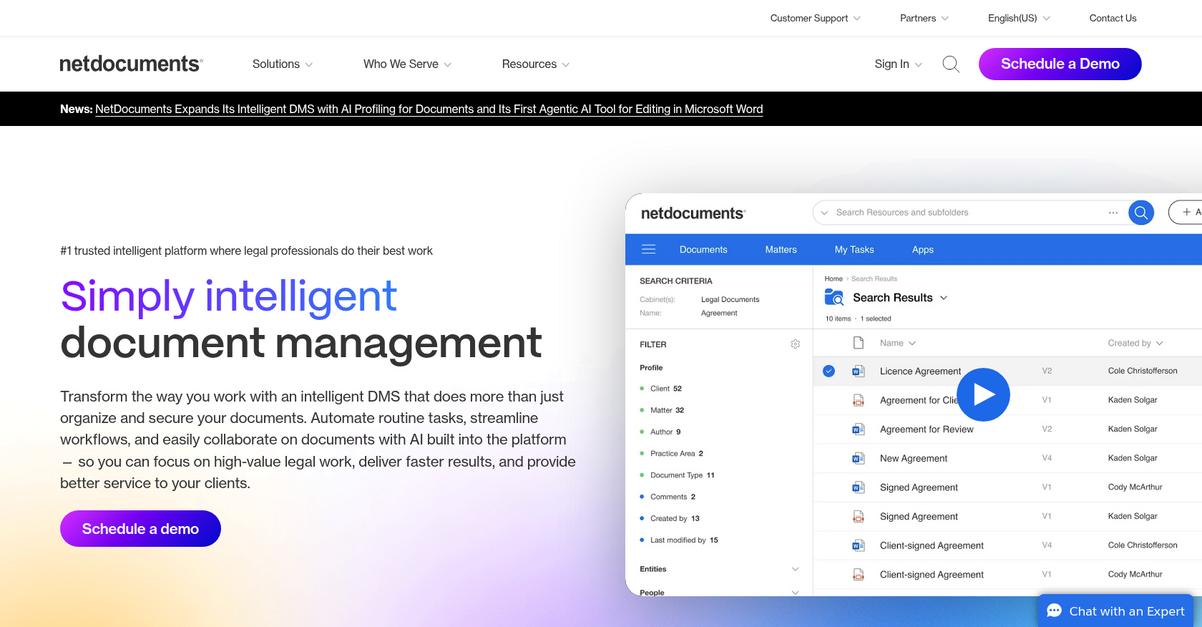
NetDocuments goes beyond standard document management by focusing on enterprise-grade security, dynamic client workspaces, and AI-powered search that Filevine simply can’t match.
If you’re tired of limited integration and frustrating search tools, NetDocuments solves this with AI-driven search and intuitive Office integration for legal work. That’s how you remove friction from your daily legal workflow and reduce risk from human error.
Here’s where the alternative really pays off.
NetDocuments brings you simplicity and peace of mind.
Instead of wrestling with Filevine’s workflow headaches, you can rely on NetDocuments to deliver a legal-centric, secure platform for managing and finding documents efficiently.
You’ll find that your sensitive client files are protected with advanced encryption, data loss prevention, and compliance tools exceeding what Filevine can offer. The enterprise-level controls let you tailor permissions for every matter and keep your firm audit-ready.
When you’re dealing with thousands of legal documents each month, NetDocuments’ AI-powered search and matter-centric workspaces make finding key information instant. That means you spend less time digging for files and more time doing meaningful work for your clients.
For your team, deep integration with Microsoft Office 365 takes productivity further by enabling real-time co-authoring, version control, and document creation within Word, Outlook, and more. The result: all files stay within familiar tools, boosting collaboration and efficiency right from day one.
You get a secure foundation for legal work.
Key features:
- Enterprise-grade security and compliance delivers advanced encryption, ethical walls, and regulatory tools, giving you confidence for protecting sensitive legal data far beyond Filevine’s feature set.
- AI-powered matter-centric workspaces and search organize cases and documents for legal teams, making it easy to find the right information instantly and avoid wasted billable hours.
- Deep Microsoft Office 365 integration enables co-authoring, version history, and document management inside Office apps, driving productivity without leaving familiar environments.
Verdict: NetDocuments is the solution if you want a Filevine alternative that’s purpose-built for legal firms. It’s trusted by top IP firms to achieve over 2,500 hours in annual time savings, with unmatched security, powerful search, and native Microsoft Office workflows that redefine document management for legal professionals.
6. CosmoLex

Tired of clunky Filevine workflows slowing things down?
CosmoLex puts everything in one place with integrated document management, legal-specific accounting, and easy client communication—all designed to fix Filevine’s pain points.
Instead of juggling separate accounting tools, you get all-in-one management for billing, trust, and accounting tasks built right into CosmoLex. This means legal billing, document organization, and compliance are together, not fragmented across disconnected platforms.
If you’re frustrated by Filevine’s limited search and clunky interface, CosmoLex directly tackles these problems by keeping your files and financial data truly centralized. No more switching between multiple systems or losing track of document versions during busy cases.
Here’s how CosmoLex can change things.
CosmoLex solves workflow headaches by combining intuitive document management with robust financial features, giving you an alternative that streamlines every part of your practice.
You can store, organize, and retrieve all your matter-related files without hassle. Centralized version control ensures nothing gets misplaced or overwritten, so you always have the right documents at the right time—even during heavy caseloads.
Additionally, its secure client portal lets you share files and invoices safely, letting your clients access what they need while maintaining privacy. Time-consuming admin work drops, so you focus more on actual legal work, not chasing paperwork.
The result is a better workflow for your whole firm.
Key features:
- Integrated legal accounting alongside document management ensures your billing, trust accounting, and case files are handled together, eliminating the dual-system headaches from Filevine’s third-party integrations.
- Centralized file storage with version control keeps all client documents under one matter, reduces the risk of misplacement, and gives your team an always up-to-date document set.
- Easy-to-use secure client portal allows you to exchange documents and invoices, and message clients securely, improving communications and reducing misdirected or lost information.
Verdict: CosmoLex stands out as a Filevine alternative for law firms needing robust document management with real legal accounting built in. Firms switching to CosmoLex report saving 10% to 20% on admin time, translating directly into more billable work—so your workflow and revenue both get a serious upgrade.
7. MyCase

Is Filevine making your legal workflows harder than they should be?
MyCase’s intuitive document management and client portal address common Filevine headaches around clunky navigation and fragmented client communications.
You’ll get an interface where drag-and-drop, version control, and secure sharing are actually easy to use compared to Filevine’s more complicated setup. Search for case files without the frustration too.
The result is a much smoother experience.
MyCase stands out as a Filevine alternative by giving your legal team an accessible cloud platform built specifically for legal workflow efficiency. Everything feels less technical and more natural, so you’re not stuck constantly troubleshooting or retraining your team.
You can count on simple full-text search and secure client messaging from a unified portal to make a difference as soon as you switch. MyCase lets you organize, share, and update documents faster, without the “where is that file?” guessing game that often plagues Filevine users.
Additionally, integrated billing and payment features mean you’re not juggling separate systems for financials and casework. MyCase ties it all together, so every step–from initial consultation to billing–lives under one roof, saving you time and keeping your workflows in sync.
All this means you’re reducing chaos, boosting client satisfaction, and reclaiming your workday.
Key features:
- User-friendly drag-and-drop document management streamlines file uploads, secure sharing, and version control, making it far easier to organize and locate case files than with Filevine’s more technical interface.
- Integrated secure client communication portal brings messaging, document sharing, and calendar syncing together, so your clients stay in the loop and you cut down on unnecessary back-and-forth.
- Built-in billing and online payments simplifies invoicing and expense tracking by connecting financial workflows directly with your case management—saving you the hassle of managing multiple platforms.
Verdict: MyCase is a proven alternative to Filevine for legal teams craving less friction and more results from their document management software. Users report 30% less time on admin tasks and notably better client satisfaction scores, all thanks to its intuitive client portal and all-in-one platform approach.
8. Smokeball

Looking for a smoother legal workflow experience?
Smokeball delivers automatic time tracking and document automation that directly solve many of the biggest frustrations Filevine users have around cumbersome billing and repetitive document tasks.
You can supercharge productivity with Smokeball by leveraging automatic time tracking and more robust legal automations that Filevine simply can’t match.
Here’s why legal professionals are making the switch.
Smokeball transforms your daily legal work with powerful automation and user-friendly design, making document management and billing simple and more accurate.
The platform replaces Filevine’s manual time entry process by automatically capturing every billable minute—emails, phone calls, and document creation are all tracked passively, so you never miss billable hours again.
You’ll also get access to a massive, constantly updated library of jurisdiction-specific legal forms plus advanced document drafting from templates—features built for busy legal teams moving away from Filevine’s limited automation options.
Additionally, automatic document generation and rich compliance libraries work together to ensure your documents are not only quick to produce but also always up to date and accurate.
Switch for features your workflow actually needs.
Key features:
- Automatic Time Tracking for every activity eliminates manual time entry by passively capturing all client work, leading to more accurate billing and increased revenue per matter compared to Filevine’s dated approach.
- Advanced Document Automation with smart templates lets you generate new case documents in minutes using rich, customizable templates, reducing time spent on repetitive drafting by 50% or more.
- Expansive Legal Forms Library updated for compliance offers direct access to the most current jurisdictional forms and templates, saving countless research hours and boosting compliance confidence.
Verdict: If you’re aiming to boost profitability and efficiency, Smokeball is one of the best Filevine alternatives for document management software for legal firms. Legal professionals have seen over 50% increases in billable hours with no extra work required, thanks to Smokeball’s unique automation and legal forms library.
Conclusion
Tired of Filevine slowing your workflow down?
Dealing with confusing menus, sluggish search, and unreliable integrations wastes your time and makes daily work more frustrating than it should be.
You’re smart to look for real alternatives—because sticking with clunky tools hurts your firm’s productivity week after week and holds you back from the seamless workflow you want.
Let’s make this transition easier.
FileCenter is my top pick in this list for frustrated Filevine users ready to streamline legal document management for good.
Unlike Filevine, FileCenter keeps things simple with an intuitive desktop interface, super-fast search, and powerful scanning—ideal for firms tired of endless clicks and cloud headaches. It’s the alternative lawyers actually enjoy using.
I encourage you to start your free FileCenter trial and see how much smoother managing your documents can be.
Experience the efficiency and control you’ve been missing.