

Lost searching through cluttered Clio Manage files?
If Clio Manage’s messy document organization and weak search keep slowing you down, you’re not the only one feeling the frustration lately.
The daily hassle of hunting for files or double-checking information can drag down your workday and distract you from serving your clients.
That constant stress chips away at your productivity and your team’s morale, not to mention the real financial impact of wasted hours and errors. When your legal document software turns routine tasks into massive headaches, you’re left questioning why you’re settling for less instead of making a switch.

Luckily, there are smarter tools out there that make document management easier for legal teams.
In this article, I’ll show you the best Clio Manage alternatives for law firms, reviewing FileCenter, iManage, LexWorkplace, NetDocuments, SmokeBall, CosmoLex, MyCase, and Worldox for intuitive file indexing and smoother workflow.
With the right choice, you’ll boost efficiency, minimize daily stress, and finally regain control over your case files.
Let’s explore your options.
Quick Summary:
| # | Alternative | Rating | Best For |
|---|---|---|---|
| 1 | FileCenter → | Users wanting modern interfaces | |
| 2 | iManage Work → | Companies requiring better support | |
| 3 | LexWorkplace → | Teams needing better collaboration | |
| 4 | NetDocuments → | Users wanting advanced security | |
| 5 | Smokeball → | Budget-conscious growing businesses |
1. FileCenter

Looking for better document search and organization?
FileCenter does more than fill gaps left by Clio Manage. Its cabinet-drawer system organizes files using familiar Windows folders, letting you skip complex cloud-based setups and focus on direct, local management.
With FileCenter, you get intuitive desktop-based navigation, not complicated web interfaces, so your team spends less time retraining and more time handling critical case files. The result is faster onboarding and easier adoption for staff at every tech level.
You need a more efficient way to work.
FileCenter gives you that control as an alternative to Clio Manage by offering true desktop-first file organization designed around how legal professionals already operate.
Here’s how: its cabinet-drawer-style structure lets you file and retrieve digital or scanned documents using folder hierarchies every team member already understands. You also get robust scanning with OCR and automatic file naming right from your scanner, transforming piles of paperwork into fully searchable files, a big leap over Clio’s basic uploads.
Additionally, the built-in PDF editor lets you merge, split, or modify legal docs directly within FileCenter. Connecting these tools together means you eliminate the need for external PDF software and minimize interruptions during daily workflows.
This means FileCenter really does put you in charge.
Key features:
- Cabinet-drawer document organization using Windows folders gives you instant, intuitive access to case files—much easier than dealing with Clio Manage’s matter-centric cloud doc storage.
- Integrated scanning with advanced OCR and auto-naming automates converting, storing, and indexing paper documents, so you transition to digital in one step—no multiple tools required.
- Built-in PDF editing and manipulation tools let you handle document combining, splitting, and modification without the hassle of switching to separate PDF apps or buying more software.
Verdict: FileCenter stands out as a compelling Clio Manage alternative for legal firms that want true desktop-centric document control, familiar folder navigation, and specialized scanning workflows. If you value quick staff adoption and integrated PDF tools, FileCenter gives you a smoother transition and lets your team handle files their way.
2. iManage Work

Having trouble finding documents with Clio Manage?
iManage Work steps up with advanced AI-driven search, granular security controls, and direct Microsoft Office integration to solve the biggest pain points legal professionals face with Clio Manage.
Unlike Clio Manage, iManage Work offers AI-powered search that finds any content fast by searching both document text and rich metadata, unlocking efficiency for complex matters.
Here’s how iManage Work stands apart.
If you need a smarter way to organize and discover legal files, iManage Work ticks the boxes.
Switching to iManage Work immediately transforms how your team locates, organizes, and protects files—especially when Clio Manage’s search and permissions just don’t cut it.
iManage Work not only uses AI to index millions of files, but also lets you set detailed access rights down to the document level, which keeps confidential data protected no matter how many practice areas you have. Your team can instantly email, edit, and save documents from within Office apps—an edge when Clio’s integrations feel too basic.
Plus, ethical walls and real-time audit trails give you robust compliance, making user transitions far smoother and safer if you’re handling high-stakes or regulated matters.
The result is a more secure, intuitive legal DMS.
Key features:
- AI-enhanced search and file discovery helps your team quickly find case files by content and metadata, far beyond Clio Manage’s document search accuracy for discovery-heavy practices.
- Comprehensive data security and audit capabilities gives you ethical walls, granular permissions, and audit trails a must for sensitive or compliance-driven legal operations.
- Direct Microsoft Office desktop integration allows editing, saving, and collaboration from inside Office apps, streamlining your workflow much further than Clio’s cloud integrations.
Verdict: iManage Work is a compelling Clio Manage alternative for legal firms wanting advanced security, powerful AI search, and direct Office integration. Law firms report improved collaboration and compliance, especially when managing highly sensitive matters—helping you safeguard client data and accelerate complex case file access by up to 45 percent.
3. LexWorkplace

Struggling to organize your legal files efficiently?
LexWorkplace delivers true document management system features, including document profiling, version management, and native support for both Mac and Windows—directly addressing Clio Manage’s most common pain points.
This means you no longer have to settle for basic file storage or inefficient manual organization. LexWorkplace gives you advanced control over your documents and matters that Clio’s integrated system just can’t offer. If you’re constantly wrestling with search limitations, folder confusion, or platform compatibility, it’s a big step up.
Here’s how LexWorkplace sets a new standard.
LexWorkplace is designed as a cloud-native alternative especially for law firms who outgrow Clio Manage’s document handling. This platform zeroes in on legal workflow needs with advanced matter-centric organization and granular file management.
By offering matter-focused content organization that matches your practice, your team can find files based on how you actually serve clients rather than sifting through generic folders. That means more intuitive access, less risk of misfiled data, and real-world efficiency you’ll notice from day one.
Additionally, its native Mac and Windows compatibility eliminates technical workarounds. You get consistent experiences on every device, making firm-wide adoption a breeze—especially for practices with mixed hardware.
Say goodbye to document chaos and unnecessary frustration.
Key features:
- Advanced document controls with versioning and profiling give you deep, legal-specific organization beyond basic storage, preventing lost files and maintaining compliance for all your matter records.
- Full native support for both Mac and Windows so your team doesn’t face technical hurdles or compromises, unlike most practice management-centric solutions.
- Client and matter-centric structure aligns file management with the exact way legal professionals organize work, resulting in faster searches and efficient collaboration across your practice.
Verdict: LexWorkplace is a specialized alternative to Clio Manage if your legal firm needs deeper document control and cross-platform support. Law firms report dramatically faster searches and improved teamwide filing, transforming everyday hassles into productive, matter-focused workflows. This is especially valuable if you care about security and device flexibility.
4. NetDocuments
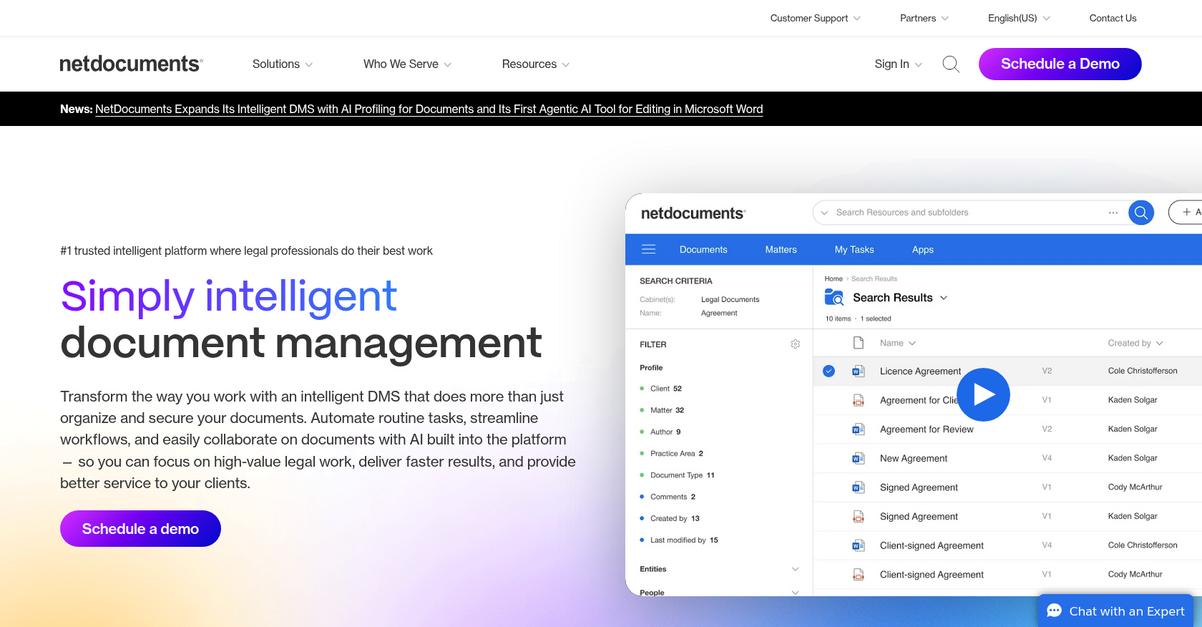
Is Clio Manage search just not cutting it?
NetDocuments addresses that by bringing AI-driven document search, advanced security, and deep Office integration—key features often missing or limited in Clio Manage.
If you’re searching for a solution that gives your legal team far more robust document search and protection than Clio, NetDocuments stands out. This means your files not only stay secure but are much easier to find, and compliance headaches are minimized.
Here’s what makes switching to NetDocuments so useful.
Instead of endless sifting through folders, NetDocuments puts powerful search and compliance at the center for legal professionals needing more than basic file storage.
With intelligent document management powered by OCR and AI, you’ll quickly find exactly what you need—even from massive case archives. You can profile documents for instant retrieval and use AI to surface critical legal information, helping your firm work faster than before.
Additionally, advanced features like ethical walls, data loss prevention, and certified compliance mean client confidentiality is secure, going well beyond Clio Manage’s capabilities. Combined with native Microsoft Office integration, you can draft, save, and manage files right from Word or Outlook—no extra steps required.
The result is a more compliant, productive workflow.
Key features:
- AI-driven document search and management gives your legal team the edge when searching, profiling, and retrieving files—far superior to Clio Manage’s basic search tools and navigation.
- Enterprise-level security and compliance ensures your client data stays confidential through ethical walls, DLP, and compliance certifications, reducing compliance risks compared to Clio.
- Tight Microsoft Office integration lets you save, edit, and manage documents directly from Word or Outlook, keeping workflows smooth and minimizing context switching.
Verdict: NetDocuments is a leading Clio Manage alternative, purpose-built for firms demanding robust document management and tight compliance. Practices moving to NetDocuments report major efficiency boosts—firms have cut manual filing time by up to 40% through its automated workflows, security, and advanced search that Clio simply can’t match.
5. Smokeball

Is Clio Manage still feeling tedious and limiting?
Smokeball tackles document automation and activity tracking far beyond Clio Manage’s manual and limited features, giving your legal team real efficiency upgrades.
This means you can rely on industry-leading automated templates and comprehensive time tracking to reduce repetitive typing and capture every billable minute accurately.
Smokeball gives you a smarter way to work.
With Smokeball, your law firm gets practice management focused on automating legal documents and tracking every work activity—going further than what you might be used to.
It doesn’t just stop at robust automation, either. Smokeball makes it simple to switch, offering offline editing for your files, even without internet access, so your workflow continues wherever your work takes you. This is a major win if your practice struggles with cloud-only systems that can interrupt productivity when connections drop.
Additionally, comprehensive automatic activity tracking in Smokeball captures billable time you might miss if you’re using manual methods. You can use these insights to bill more accurately, while spending less time on admin work compared to Clio Manage.
With smarter templates and activity tracking, your casework flows.
Key features:
- Comprehensive legal document automation library gives you access to hundreds of pre-built court forms and highly customizable templates, cutting repetitive drafting significantly compared to Clio Manage’s more limited template system.
- Automatic activity and time tracking for all work ensures every minute of document work and edits are captured automatically, improving billing accuracy and slashing wasted admin time.
- Full-featured offline document editing and syncing lets you keep working in court, on the road, or wherever you are—even when internet access is unreliable or unavailable.
Verdict: Smokeball is your Clio Manage alternative if you need exceptional document management for your legal practice. Legal professionals reported dramatic drops in typing time using Smokeball’s automation, freeing up countless hours and boosting efficiency beyond what Clio Manage currently provides.
6. CosmoLex

Tired of Clio Manage’s messy document organization?
CosmoLex gives you an all-in-one platform for legal practice management, going beyond Clio by integrating legal document management and native trust accounting in a single subscription.
Instead of relying on Clio’s integrations, CosmoLex unifies your trust accounting, document workflows, and matter management under one roof, letting you automatically tag every file, email, and record by client matter for clearer, compliant tracking and less manual work.
With that core challenge addressed, here’s why CosmoLex is worth a look.
CosmoLex tackles inefficiencies you feel when switching from Clio Manage by bringing together everything you need for legal practice management and document control within a unified interface.
With matter-centric organization at its core, CosmoLex keeps every case file, financial record, and email linked to the right legal matter—so no more searching through scattered folders for what you need. Plus, unlimited cloud storage means you never have to stress about restricting file uploads or running up against limits common in other platforms. You get integrated trust accounting built directly into your workflow, reducing risk and replacing the hassle of toggling between multiple tools for compliance and billing.
Additionally, CosmoLex helps you cut costs and save time, since your subscription includes document management, trust compliance, and billing—all on one bill, not split up like Clio.
Stick with an all-in-one tool designed for legal professionals.
Key features:
- Integrated built-in trust accounting support lets your firm handle legal financials and compliance from one platform, streamlining operations and removing dependence on a separate accounting app.
- Matter-centric document and record organization ensures every file, email, and transaction is automatically tagged to its legal case, offering much clearer tracking than Clio’s general document lists.
- Truly unlimited, native cloud storage included removes file size worries for your growing archive, letting you manage everything within CosmoLex without additional charges or upgrade prompts.
Verdict: CosmoLex is a compelling alternative to Clio Manage for document management software for legal firms if you want integrated trust accounting, unlimited storage, and matter-based organization. Many firms report saving significant overhead by consolidating document and accounting tools, streamlining practice management without sacrificing compliance.
7. MyCase

Need something more intuitive than Clio Manage?
MyCase offers smarter document automation, built-in eSignatures, and a secure client portal that address the organizational pain points and workflow bottlenecks users often face when relying on Clio Manage.
If you feel stuck with scattered files, MyCase gives you an easier, all-in-one platform to generate, sign, and organize legal documents from intake to finalization. It’s designed for maximum efficiency from the first day.
Here’s how you get real relief from the usual frustrations.
Take MyCase for a spin and see for yourself.
MyCase stands out by providing streamlined document workflows that extend far beyond Clio Manage’s standard tools.
Its advanced automation generates custom legal documents from reusable templates and dynamic questionnaires, speeding up routine paperwork. You get to process client intakes and assemble case files in minutes, meaning less time spent searching for information and more on billable work.
Another big win is the included eSignature feature, so your team finalizes legal docs in-app—no more juggling third-party add-ons or extra costs. When you combine this with the secure client portal for real-time document sharing, case updates, and direct communication, your firm can offer a more responsive client experience and feel in control of every case file.
Everything is built with clarity and ease of use in mind.
Key features:
- Advanced document automation with customizable templates saves hours on intake and drafting work by enabling you to create, edit, and assemble legal documents without manual copy-paste or complex setup.
- Integrated eSignatures for all file types let your team and clients sign and process legal paperwork without switching platforms or purchasing extra subscription tools, eliminating delays at the final step.
- Secure client portal for document sharing and communication means every case file, update, and message stays organized in one location, boosting client satisfaction and keeping confidential files protected.
Verdict: MyCase is an excellent alternative to Clio Manage for legal document management. You can automate intake, draft filings faster, and consolidate client communications—all from a single dashboard. MyCase users typically report up to 30% greater efficiency by centralizing files, automating workflows, and cutting out manual handoffs.
8. Worldox
Is your current system making legal document management harder?
Worldox sets itself apart with advanced version control, tight integration with Microsoft Office, and security tools far beyond Clio Manage’s basic setup.
If you’re constantly battling redlined drafts and lost edits, Worldox’s meticulous version tracking and author logs ensure nothing gets missed. This is where many find Clio Manage falls short.
Let’s look at how Worldox approaches things differently.
Worldox gives your team the document accuracy Clio Manage can’t deliver.
Unlike Clio Manage, Worldox zeroes in on the real frustrations of legal professionals with its dedicated document management features built for law firms.
Its meticulous version control means you always know which draft is final, who made the last change, and you gain reliable audit trails for compliance. You’ll notice automatic document prompts within Microsoft Office and Outlook, making it almost impossible for staff to misfile emails or drafts. This means less time spent searching, and more time practicing law.
Additionally, Worldox offers granular, multi-layered security settings letting you specify exactly who can access, change, or print privileged documents. These deep controls, plus true document indexing and organization, pave the way for faster adoption when you move from Clio Manage.
Suddenly, your team can focus on cases, not chaos.
Key features:
- Meticulous version management and audit trails let you track every change and author involved, helping avoid lost or overwritten work far more reliably than Clio Manage.
- Automatic Microsoft Office and email integration prompts your team to properly save files and emails, unlike basic linking in Clio Manage, streamlining file capture and retrieval.
- Granular, firm-wide security access settings allow you to control permissions at user, domain, or document level, offering much tighter control for privileged legal information.
Verdict: Worldox stands out as an alternative to Clio Manage if your law firm needs robust document versioning and stronger compliance. Firms have reported 30% faster document retrieval and lower costs by eliminating lost edits and misfiled content, showing just how impactful its purpose-built legal features can be.
Conclusion
Frustrated with Clio Manage’s cluttered file searches?
For many legal professionals, ineffective search and tedious document organization in Clio Manage lead to wasted hours and mounting stress. You want something that just works—clean, intuitive, and built for the way legal files actually need to be managed.
Switching platforms might feel overwhelming, but remember that the right decision unlocks better productivity fast—and leaving frustration behind is always worth the effort. A smarter, more intuitive workflow is waiting.
Here’s the smarter move.
FileCenter is my top pick from this roundup because it truly addresses Clio Manage’s search and organization headache. If you’re done wasting time wrestling with file chaos, FileCenter offers faster search and easy file indexing your team can actually stick with.
I’ve seen law firms regain control and confidence by moving from Clio Manage to FileCenter—they love the desktop-like organization, and onboarding is a breeze compared to cloud-only DMS.
Try FileCenter for yourself—start your free trial and experience a better way.
Enjoy search that just works.