
Tired of fighting CMiC on site?
You’re probably fed up with CMiC’s clunky interface, terrible mobile access, and slow submittal or RFI workflows that drag down your team.
These limitations quickly turn everyday tasks into frustrating bottlenecks and put deadlines at risk.
Every wasted hour is money lost, team morale slipping, and compliance headaches multiplying—nobody wants to keep struggling when CMiC keeps holding them back.

The truth is, you deserve tools that actually work for on-site project teams, not against them, and making the switch is sometimes the only way to end the pain.
In this article, I’ll show you the best CMiC alternatives that deliver what construction companies actually need from document management software, from mobile-first access to better workflows. I’ll break down options like FileCenter, Bluebeam, Procore, Bentley, Autodesk, Aconex, Buildertrend, and SafetyCulture.
You’ll finally gain the control and efficiency CMiC promised—but couldn’t deliver.
Let’s find your solution.
Quick Summary:
| # | Alternative | Rating | Best For |
|---|---|---|---|
| 1 | FileCenter → | Users wanting simple control | |
| 2 | Bluebeam Revu → | Teams needing better collaboration | |
| 3 | Procore → | Mobile-first field teams | |
| 4 | Bentley ProjectWise → | Engineering projects needing BIM | |
| 5 | Autodesk Docs → | Design-heavy project teams |
1. FileCenter

Feeling boxed in by CMiC’s complicated document workflows?
FileCenter gives you tools designed for simplicity, using a familiar cabinet-and-drawer Windows folder structure that takes the complexity out of daily construction file management.
You can save valuable time with integrated OCR and scanning, letting you digitize paper-heavy documents automatically into searchable PDFs. This is a step up from the manual data entry and convoluted navigation you might deal with using CMiC.
Switching to a simpler system is easier than you think.
FileCenter is built to help you break free from CMiC frustrations by putting document control back in your hands.
The platform’s cabinet-style organization and local-first approach let you find and file documents just like using real drawers, which is proven to accelerate onboarding and reduce the learning curve for your field teams. This means you can tackle those overflowing paper files, knowing everything will be easy to retrieve later.
Additionally, you’re in control of costs. FileCenter offers a one-time perpetual license alongside subscriptions, so if you prefer a single investment for robust local file management, you’re covered. Your team keeps ownership of their process with affordable pricing, and avoids the ongoing enterprise subscription fees CMiC locks you into.
Your document headaches finally have a clear solution.
Key features:
- Cabinet-and-drawer file organization for instant adoption replaces complicated ERP databases with a structure that mimics physical filing, so your project staff can start managing files within minutes.
- Integrated OCR and batch scanning digitizes paper construction records into searchable PDFs right as you scan, automating what’s manual and slow with CMiC.
- One-time perpetual software license for cost control lets you buy FileCenter outright, avoiding enterprise subscription bloat and keeping long-term costs predictable for small construction firms.
Verdict: FileCenter stands out as a smart alternative to CMiC when your construction team values hands-on control, minimal learning curve, and lower costs. Users report saving several hours a week by eliminating manual filing, with up to 100% more efficient document searches compared to legacy systems.
2. Bluebeam Revu

Looking for smoother drawing reviews than CMiC?
Bluebeam Revu gives your team specialized PDF markup and real-time collaboration tools, directly targeting the clunky workflows and limited mobile flexibility you might be facing with CMiC.
Unlike CMiC’s basic annotation tools, Bluebeam Revu lets you enable dynamic, field-ready markup sessions for better design reviews and faster project feedback on site.
You get stronger project control instantly.
If you crave more nimble drawing management, Bluebeam Revu steps up by letting you organize, review, and coordinate project documents far more effectively than what you experienced in CMiC.
Here’s how your projects become easier and quicker with Revu.
With Studio Collaboration Sessions, everyone in your project—whether in the office or out on-site—can mark up the same PDF drawings live. This reduces wait times, confusion, and keeps revisions up to date automatically.
Plus, your team benefits from advanced markup tools that handle takeoffs, measurements, and annotations right on digital plans, letting you flag field issues or clarify RFIs as you go. That’s a practical game-changer after the slower, indirect workflows in CMiC.
Another standout is how Sets combines multiple PDFs into one navigable file, keeping all revisions in a single, always-current place. This means your field crews never lose track of the latest set, minimizing costly surprises.
Switch with confidence using smarter construction workflows.
Key features:
- Studio Collaboration Sessions for real-time markup allow your entire project team to review PDFs at once, speeding up drawing review cycles compared to CMiC’s slower document exchange processes.
- Comprehensive markup and measurement toolset equips your team to handle digital takeoffs and annotate directly on plans, ensuring design intent and field issues are captured precisely every time.
- Sets for combined drawing management keeps all required documents and revisions in one navigable location, eliminating the version confusion that can happen with CMiC’s conventional folder systems.
Verdict: Bluebeam Revu stands out as a CMiC alternative focused on smarter construction document management. Field teams report up to 60% faster drawing reviews and fewer project errors. If you’re seeking advanced markups, streamlined drawing sets, and real-time collaboration, Revu brings your construction document workflows up a level.
3. Procore

Is CMiC holding your project documents hostage?
Procore puts every file, drawing, and submittal at your fingertips while eliminating the clunky, confusing interfaces that often trip you up in CMiC. Its Documents Tool centralizes your project files with clear version tracking, straightforward permissions, and accessible cloud storage—something CMiC users say is critical but missing.
This means your field crews finally get an interface so intuitive they actually want to use it, not just tolerate it because it’s required.
You shouldn’t have to settle for less.
Procore tackles the same core needs but does it by focusing on your team in the field.
The platform gives your field teams real mobile power, letting them handle documentation wherever they are—not just in the office. Plus, you get up to 50% less admin time, with one connected project record that eliminates silos. Unlike CMiC, Procore integrates drawings, RFIs, specs, submittals, and daily logs in one place so you can stop jumping between modules and focus on the work.
Additionally, Procore’s robust mobile access means your teams aren’t hunting for Wi-Fi or fighting with awkward file uploads. Everything flows automatically from device to cloud, so project updates stay current, permissions stay tight, and nothing falls through the cracks as you switch.
With these tools, you can actually move your document management onto the jobsite.
Key features:
- Centralized cloud file storage with version control keeps every drawing, submittal, and file organized, tracked, and accessible—giving you clarity missing in CMiC’s more fragmented document system.
- Full-featured mobile access for field productivity lets your crews upload, view, and search documents from anywhere, driving real adoption and faster updates directly from the jobsite.
- Unified project record across documents and workflows connects drawings, RFIs, submittals, and daily logs for seamless tracking and search, eliminating silos that often disrupt CMiC workflows.
Verdict: Procore stands out as a top CMiC alternative for construction document management, especially if you want mobile-first tools and easy adoption. Customers have cut administrative effort in half and gained central control over all project documents—exactly what you need for compliance and efficiency.
4. Bentley ProjectWise

Looking for more robust control over project documents?
Bentley ProjectWise is built for infrastructure and engineering projects, giving you managed workflows and BIM integration where CMiC typically falls short.
You’ll get advanced automation for review, approval, and design file management—helping your team avoid missing updates and version errors—keeping even your largest projects on track.
This capability really shifts your whole project approach.
Bentley ProjectWise directly addresses those pains with CMiC by giving you powerful workflow automation and BIM integration purpose-built for construction and engineering projects.
Here’s how it works in practice: you can automate every document review and approval step with detailed audit trails, while referencing 2D or 3D design models in real time—something CMiC can’t match for deep design project needs.
Additionally, ProjectWise centralizes all your project data no matter what authoring tool is in play. That means everyone—from field engineers to the design office—works off the same, always-current files, drastically reducing mistakes and confusion that happen with standalone repositories.
The result: users report up to a 25% reduction in project delivery time thanks to improved design data consistency and far fewer errors from lost or outdated files.
Consider this boost if you want maximum efficiency.
Key features:
- Managed workflows and approvals with audit trails automate every stage of document review, keeping tight control over engineering deliverables while minimizing human error and missed steps.
- Direct BIM integration supporting both 2D and 3D files ensures your project documents stay synced with live design models for accurate, model-driven construction execution—something CMiC doesn’t fully address.
- Connected data environment for global collaboration lets your team access and manage engineering documents across multiple authoring tools, promoting cross-discipline coordination and eliminating confusing file versions.
Verdict: Bentley ProjectWise is a compelling CMiC alternative tailor-made for your engineering and infrastructure projects. You gain advanced workflow control, deep BIM integration, and unified data environments that cut project delivery times by up to 25%, delivering measurable ROI and fewer costly errors.
5. Autodesk Docs

Is CMiC leaving your field teams frustrated?
Autodesk Docs tackles those on-site struggles with its user-friendly interface and design-centric environment, fixing hassles with clunky CMiC navigation and scattered files.
Instead of endless searching or chasing the right version, you get automatic version control with visual markups and model integration that your project managers and field staff will actually use and trust.
Plus, those delays from disconnected RFI or submittal processes across your teams become a thing of the past.
Here’s how Autodesk Docs truly helps you move forward.
Unlike old-school systems, Autodesk Docs gives you a common data environment right out of the box, letting your documents, drawings, and models live in one central place.
You’ll love being able to track issues directly in 2D and 3D models—something CMiC cannot match—so you’re always working with up-to-date information and context, whether you’re in the office or walking the site.
If your team is tired of double-entry with disconnected workflows, Autodesk Docs streamlines document-driven processes by linking files with RFI and submittals, automating communication so your data flows wherever it’s needed.
This gives you consistent, reliable control at every step.
Key features:
- Automatic version control and markups on drawings ensure every project participant works from the most current set, eliminating costly errors and confusion often seen with legacy platforms.
- Integrated RFI and submittal workflows tie project files to your communication processes, minimizing manual effort and automating tasks that often require tedious workarounds in CMiC.
- Native 3D model viewing and data extraction let you review, reference, and track issues using design intelligence, giving your team capabilities that basic document management modules simply cannot provide.
Verdict: Autodesk Docs is an excellent CMiC alternative for document management software in construction. Users report 20% faster RFI creation and major gains in document control, especially for design-heavy projects. You’ll get more reliable, modern tools that cut busywork and boost collaboration right on site.
6. Oracle Aconex

Tired of CMiC’s clunky document management?
Oracle Aconex delivers a neutral cloud platform built for complex construction projects, offering advanced audit trails, mobile collaboration, and real-time document control where CMiC often falls short.
Your team gets comprehensive audit logging of every document action, automatic tracking of emails alongside project files, and a genuinely open collaboration hub. This means you gain accountability and transparency unmatched by most project tools.
Here’s why that’s a game changer for construction.
With Oracle Aconex, you unlock a solution designed to handle your needs.
Compared to rigid or fragmented options like CMiC, Oracle Aconex stands out for its ability to drastically improve document organization and accountability on your construction projects.
Moving your projects into Aconex lets you instantly upgrade project-wide document control as you shift away from CMiC’s limitations.
Your whole team experiences stronger compliance, less risk of lost documents, and a mobile-centric interface that actually works on-site.
One highlight is the unalterable audit trail for all actions, so every file version, comment, and RFI is permanently tracked. You always know who did what and why — the audit history gives you bulletproof traceability for disputes or compliance reviews, solving a major frustration from CMiC’s limited visibility.
Additionally, linked mail and document control means every decision and file exchange is attached to the right record, making RFIs and submittals easier to manage and review. Plus, the neutral document collaboration environment brings all your outside partners into the workflow, reducing silos and making document handoff smoother.
This is document control built for construction.
Key features:
- Complete project-wide audit trail for accountability captures every edit, comment, approval, and transfer, offering a visible, unalterable history—far more comprehensive than what CMiC records or displays.
- Linked mail and document management in one platform directly associates all project email threads with relevant files, ensuring every decision and exchange is immediately accessible and traceable by your team.
- Neutral, multi-party collaboration environment allows external stakeholders, vendors, and subconsultants to securely participate without internal system barriers, breaking data silos and reducing costly miscommunication.
Verdict: Oracle Aconex is a robust CMiC alternative if you want true project-wide document control and traceability for construction. Projects average a 50% drop in RFI and submittal processing times with Aconex, making it easier for your field teams to stay compliant, transparent, and efficient across every job.
7. Buildertrend
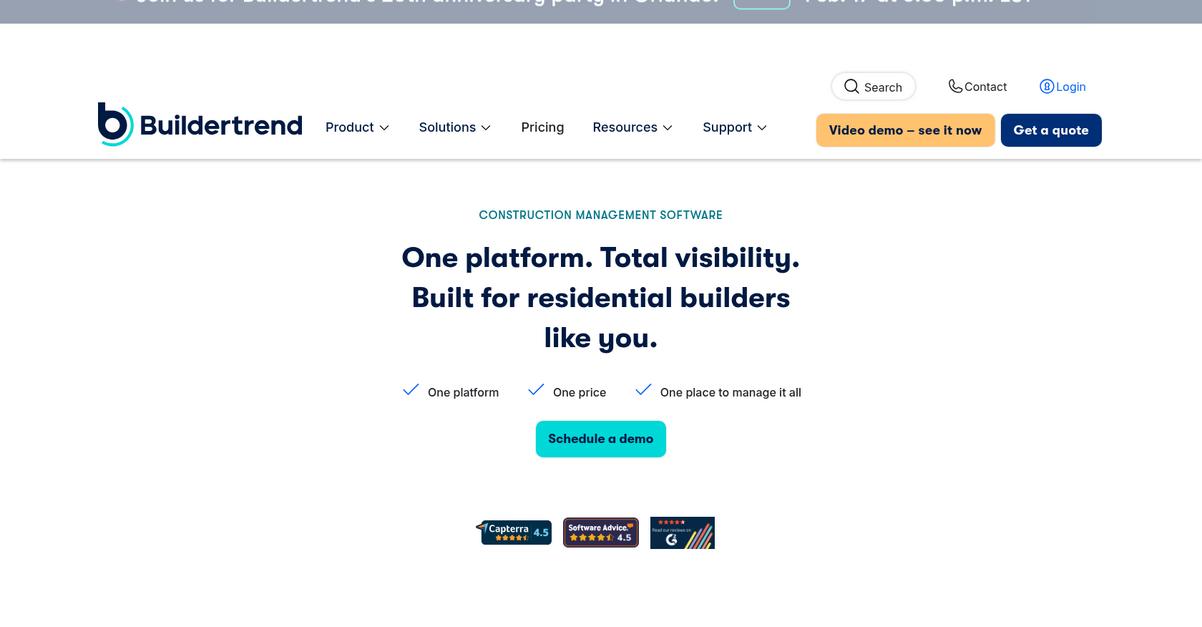
Is CMiC’s clunky interface blocking your project workflows?
Buildertrend gives you mobile-first daily logs, quick photo uploads, and true client portal access, solving the site documentation hassles that CMiC users vent about.
You’ll immediately notice that Buildertrend’s platform delivers a far more intuitive way to manage RFIs, photos, and documents from any job site. Its unlimited storage and versioning means no more digging through confusing folders or worrying about outdated plans.
Here’s how Buildertrend makes switching actually work.
It’s built to get you out of your office and onto your site with every critical document at your fingertips.
Unlike CMiC, Buildertrend streamlines your entire documentation process by combining project files, daily logs, and photos into a single, easy-to-use hub.
All your project updates, approvals, and shared documents are handled in a dedicated customer portal—no more chasing clients or email chains. You’ll centralize every drawing, revision, and signoff with unlimited storage, so field teams work from the most current info.
Plus, mobile apps let site managers upload progress photos, capture daily logs, and annotate plans in seconds, driving real-time field reporting and slashing mistakes.
Buildertrend cuts your admin time and boosts field collaboration.
Key features:
- Daily logs and photo capture directly on site let your field crew attach notes and images to documents instantly, giving you better project visibility than CMiC’s reporting workflows.
- Customer portal for project updates and approvals enables clients to view real-time progress, approve changes, and access documents, increasing project transparency and communication beyond CMiC’s limited client sharing abilities.
- Centralized files with unlimited storage and version control keep all your plans, documents, and revisions organized, so you never waste time hunting for the latest file version.
Verdict: Buildertrend is your best bet if you want smoother document management and reporting than CMiC—builders using it say they save over 20 hours weekly on admin work and cut project errors by half. It’s an ideal alternative for home builders who value speed, client transparency, and real-time project control.
8. SafetyCulture

Wasting hours on CMiC’s document chaos?
SafetyCulture gives you customizable digital checklists, real-time action tracking, and a rich library of templates that tackle what CMiC struggles with—especially on the safety and compliance side.
If you’ve felt stuck with generic forms or complicated issue follow-up in CMiC, SafetyCulture is built to offer easier audit prep and safer, more accountable job sites right from your mobile device.
The gap between compliance headaches and project momentum finally closes.
SafetyCulture takes a focused approach to construction document management by helping you move your inspections, audits, and safety records online without the heavy ERP feel of CMiC.
This means you get truly mobile-first documentation, plus automated action tracking linked directly to failed inspection items—so no more scrambling to manage correction tasks or digging through emails. You can assign corrective actions instantly and track when they’re closed, which is a game-changer after wrestling with CMiC’s clunkier workflows.
Additionally, SafetyCulture includes access to a vast industry template library, letting you start with proven safety and compliance forms instead of building from scratch every time. Your team can collaborate, update, and streamline documentation across devices, giving you a clear edge for audit readiness.
All of these capabilities drive better project compliance, fewer incidents, and faster reporting.
Key features:
- Custom digital checklists and forms for inspections replace CMiC’s basic forms with tailored, mobile-friendly templates, making it easy to standardize safety workflows and maintain compliance in the field.
- Automated action and issue tracking from inspections lets you quickly assign, document, and resolve failed items, embedding accountability and visibility missing in CMiC’s issue resolution.
- Expansive library of construction-ready templates accelerates onboarding and documentation of safety, quality, and operational records, helping you avoid time-consuming setup found in less specialized systems.
Verdict: SafetyCulture is a smart CMiC alternative if you want construction-specific document control that actually simplifies audit prep and compliance. Many users see a 40% drop in safety incidents and prep audits 25% faster by digitizing their field documentation with SafetyCulture’s specialized workflow tools.
Conclusion
Struggling with CMiC’s limitations on site?
The clunky interface and poor mobile workflows just slow everyone down, making it nearly impossible to get real project control when you need it most.
Moving to a new system is a big step, but settling for frustration only saps your team’s productivity and keeps those costly headaches coming.
There’s a smarter path out there.
After looking at every alternative, I can say FileCenter is the best CMiC alternative if you want fast, intuitive document organization that’s easy to roll out—especially if you feel buried by CMiC’s complexity.
FileCenter keeps things simple, letting your project managers organize, access, and version documents without new headaches—making it a straightforward replacement for CMiC, especially for small or mid-sized construction teams.
Start a free trial or check out FileCenter’s pricing now, and see for yourself how much easier your on-site document control could be.
Escape bottlenecks—experience smoother project workflows.