
CosmoLex giving you more headaches than help?
You’re stuck wrestling with sluggish document management, clumsy integrations, and missing version control that makes even simple tasks harder in CosmoLex.
These ongoing issues can keep your entire team spinning their wheels instead of moving cases forward with confidence.
Every day wasted fighting CosmoLex’s limitations is lost revenue, drained productivity, and mounting staff frustration, making it a struggle to keep your practice running smoothly and securely.

These headaches end up costing you far more than just software fees; they create a cycle of burnout and inefficiency that’s tough to break unless you make the move to something better.
The good news is, you have options that address CosmoLex’s weak points while making document handling simple and reliable.
In this article, I’ll show you the best CosmoLex alternatives tailored for legal document management—including FileCenter, Clio, iManage, LexWorkplace, NetDocuments, Smokeball, CaseFox, MyCase, and Actionstep.
You’ll see how switching to the right tool can mean faster workflows, less frustration, and a much happier team.
Let’s find your solution.
Quick Summary:
| # | Alternative | Rating | Best For |
|---|---|---|---|
| 1 | FileCenter → | Users wanting modern interfaces | |
| 2 | Clio → | Teams needing better collaboration | |
| 3 | iManage → | Companies requiring better support | |
| 4 | LexWorkplace → | Small teams seeking simplicity | |
| 5 | NetDocuments → | Budget-conscious growing businesses |
1. FileCenter

Feeling boxed in by CosmoLex’s document tools?
FileCenter gives you a much more intuitive filing experience, with a cabinet-drawer-folder system that’s instantly familiar and easy to use for legal staff.
Unlike CosmoLex, you’ll see robust local document control with everything organized visually so your team always knows where to find what they need, without clunky interfaces or database headaches.
Here’s how FileCenter makes switching feel straightforward.
FileCenter tackles document headaches by using a simple, Windows-style folder approach instead of CosmoLex’s integrated cloud modules, keeping your legal files on your desktop for faster day-to-day access.
You also get automated file naming and smart saving, so every motion or pleading lands in the correct folder automatically—no more sorting through messy uploads as you might experience with CosmoLex.
Additionally, the integrated scanning and OCR features mean you can digitize paper files and make them instantly searchable, simplifying transitions from physical to digital records and helping your firm go paperless at its own pace.
Switching can actually be painless.
Key features:
- Visual cabinet-drawer-folder document structure lets you organize and retrieve files with the familiar Windows system, creating an intuitive experience compared to CosmoLex’s abstract database-driven system.
- Automated naming and saving rules ensure every document—whether scanned or digital—is automatically filed to the right folder, reducing manual work compared to CosmoLex’s general uploading.
- Integrated scanning and OCR support digitizes paper files in a single workflow, so legal documents are searchable and accessible right from your desktop for faster case preparation.
Verdict: FileCenter is a top CosmoLex alternative if your legal firm wants desktop-friendly, visual document management. Its cabinet-drawer-folder layout, auto-filing, and built-in OCR can save your team hours every week on filing, compared to CosmoLex’s more integrated, cloud-heavy approach for legal documents.
2. Clio

Looking for a smoother way to manage case files?
Clio offers unlimited document storage, powerful version control, and advanced search, making it a comprehensive upgrade from CosmoLex’s more basic file management tools.
You can finally stop wrestling with hard-to-find documents or limited integrations. Clio’s platform scores significantly higher in user reviews because it delivers robust document management with AI review and strong integrations, setting it apart where CosmoLex falls short.
Modern law firms want peak efficiency and smarter workflows.
Here’s how Clio provides what CosmoLex can’t.
Clio solves your core frustrations by focusing on what really matters: making document management effortless for legal professionals considering a switch from CosmoLex.
It brings unlimited storage, advanced search, and intuitive version control, letting your staff organize, locate, and secure files without extra manual effort. You can search by title, content, or metadata instantly, avoiding the hassle of digging through poorly indexed folders.
Additionally, Clio’s AI-powered document review helps you quickly extract case details, summarize lengthy documents, and gain new insights – all features CosmoLex users wish they had. Connect Clio with Microsoft Office, Dropbox, Google Drive, or even iManage and keep your tools working in unison, smoothing out your whole workflow.
The result is greater productivity, smarter collaboration, and a much easier transition if you’re moving away from CosmoLex.
Key features:
- AI-powered document review and summarization lets you extract insights, pinpoint key facts, and review lengthy case files faster, giving you a tool CosmoLex currently lacks.
- Unlimited storage with advanced search and version control means your firm can organize, track, and secure case files with more precision and zero manual chaos.
- Extensive integrations with legal and productivity apps link Clio to Microsoft Office, Dropbox, Google Drive, and iManage for a streamlined workflow unavailable in CosmoLex.
Verdict: Clio is an excellent choice among CosmoLex alternatives for legal document management. G2 ratings show Clio outperforms CosmoLex in file management (8.3 vs 6.6), and users benefit from limitless storage, advanced search, and AI review, all critical for modern law practice.
3. iManage

Does CosmoLex leave your document workflows feeling disconnected?
iManage delivers targeted content management features designed for legal work, overcoming gaps in CosmoLex’s versioning and content intelligence.
With iManage, you finally get enterprise-grade security and robust AI-powered search to handle high-volume legal documents. This means your sensitive data is better protected, and finding files takes seconds—even across sprawling data sets.
You get a truly specialized solution here.
iManage steps in where CosmoLex’s all-in-one approach can’t keep up with complex legal document needs by offering a platform designed for secure, efficient content management from the ground up.
Here’s how iManage bridges those frustrating gaps left by CosmoLex’s standard workflows for legal firms. The intelligent content management capabilities connect your data, tools, and people, so decisions are based on full context, not piecemeal information.
Plus, the built-in AI-driven search unlocks instant access to files from any repository, letting you bypass all the manual searching and version headaches you might have faced with CosmoLex.
Additionally, you’ll benefit from ethical walls and granular access controls—critical for firms with strict confidentiality or compliance needs. When you move beyond CosmoLex, your firm can finally automate routine processes, work more efficiently, and protect legal records at scale.
Your team gets security, speed, and compliance in one.
Key features:
- Intelligent content management tailored for law firms connects all your legal data, people, and existing systems, giving you more contextual decision-making power than CosmoLex’s generic DMS.
- Enterprise-grade security controls, ethical walls, and audit trails offer advanced protection and governance for sensitive legal content—perfect for meeting regulatory requirements or complex compliance needs.
- Advanced AI-powered search and content insights provide deep, actionable discovery across huge legal document collections, surpassing the search and content mining capabilities you get with CosmoLex.
Verdict: iManage is a standout alternative to CosmoLex if you need legal document management that scales with your firm’s complexity. With over 1,000 law firms reporting increased efficiency and secure handling of massive data amounts, iManage’s content intelligence, AI search, and robust security give you powerful control CosmoLex can’t match.
4. LexWorkplace

Feeling boxed in by CosmoLex’s limited document control?
LexWorkplace introduces robust matter-centric document management and advanced integrated email handling, making it an appealing choice for legal professionals seeking more than CosmoLex provides.
Compared to CosmoLex, LexWorkplace lets you organize documents, emails, and attachments all by matter, creating a streamlined workflow for complex legal cases. You no longer have to wrangle files in a generic system or worry about incomplete records.
This can transform your firm’s efficiency right away.
LexWorkplace solves these pain points as a cloud-based legal document and email management alternative. Your case files stay securely organized, while purpose-built tools cut down on administrative hassle.
Here’s how LexWorkplace goes further: its matter-centric organization collects every file, attachment, and important email under the right client and matter, not buried across generic folders. The integrated email Smart File feature gives you automatic matter suggestions and fast, bulk filing—something CosmoLex can’t match if you live in Outlook. This practical organization means your staff finds what they need faster, with less training or workflow confusion.
Additionally, LexWorkplace’s built-in Document AI tool summarizes long documents, generates draft responses, and answers content-based questions directly in your workspace. Combine that with Microsoft 365 integration, and your switch from CosmoLex comes with the tools you actually use—all making onboarding smoother for your entire team.
The result speaks for itself.
Key features:
- Matter-centric document and email management organizes every document, file, and email by client and matter, surpassing CosmoLex’s broader suite with a legal workflow-focused approach.
- Smart File with bulk email filing automatically suggests matters and lets you file multiple emails quickly, delivering more robust and convenient email management than CosmoLex offers.
- Built-in Document AI for summaries and drafting allows you to ask and answer questions, summarize documents, and draft content natively—functionality rarely found in legal document tools.
Verdict: LexWorkplace is a compelling CosmoLex alternative for legal document management, offering matter-centric filing, advanced email integration and embedded document AI. Firms report major time savings avoiding on-premise server headaches and clunky version control, making LexWorkplace an ideal fit for legal teams of 5–50 seeking smoother workflows.
5. NetDocuments
Tired of searching endlessly for the right file?
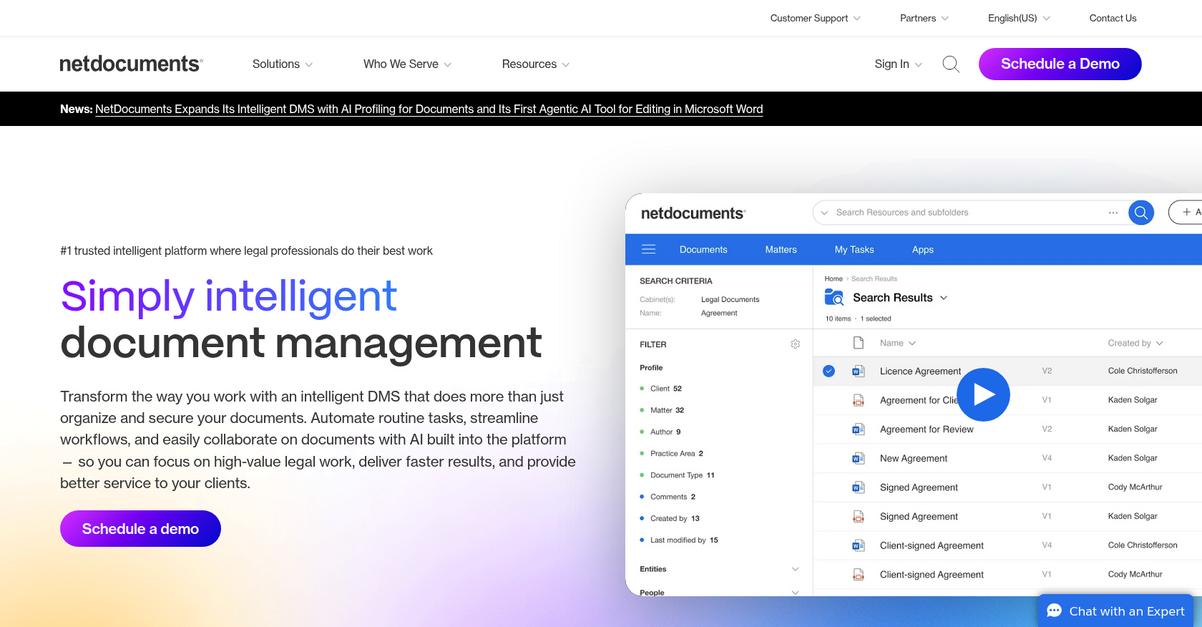
NetDocuments gives you enterprise-grade, cloud-based document management, with centralized storage, advanced version control, and robust search—key features missing or basic in CosmoLex.
Instead of grappling with clunky document handling, NetDocuments empowers your team with secure, cloud-first storage and real-time collaboration tools you simply don’t get in CosmoLex.
You don’t have to settle for subpar search and security.
Here’s how things get easier with NetDocuments.
With NetDocuments, your document management instantly feels more flexible and secure than CosmoLex thanks to its intuitive, cloud-native platform. You get centralized access without any on-premise hardware, giving your staff easy, secure file access on any device.
Let’s talk about speed—NetDocuments offers full-text search and document OCR that locates every file quickly, even scanning inside PDFs and images. If you’re drowning in case files or legacy scans, this capability alone transforms your daily workflow versus CosmoLex.
Plus, the built-in version control automatically tracks every document change, leaving a thorough audit trail. Combined with robust compliance tools, you’re always ready for discovery or audits without risking lost drafts or conflicts—a relief if you’re used to the limitations of CosmoLex document tools.
This is the upgrade your firm needs.
Key features:
- Cloud-native secure document storage and access goes beyond simple online file cabinets, offering enterprise-grade security, compliance, and anywhere-access your firm needs to protect sensitive legal data.
- Full-text search and OCR for all documents lets you instantly find any file by scanning entire content and metadata, replacing manual, time-consuming searches that slow your team down.
- Advanced version control and audit trails keep collaborative drafting organized, eliminating document confusion while enabling easy rollbacks and monitoring critical for legal compliance.
Verdict: NetDocuments stands out as the strong CosmoLex alternative if your law firm needs next-level document management. Law firms that switched report faster file retrieval and stronger compliance. You’ll see the advantages especially if your team juggles high document volumes, needs airtight security, and wants robust search capabilities.
6. Smokeball

Does CosmoLex hold back your document workflow?
Smokeball stands out by giving you powerful automated document creation, deeper legal template libraries, and built-in email management that go further than what CosmoLex offers out of the box.
Unlike CosmoLex, Smokeball lets you use automated templates to quickly generate court forms and client letters, saving you hours with every matter.
You can do a lot more with less stress.
If you want a real upgrade, Smokeball is worth exploring.
With Smokeball, you’re not just managing files—you get a full suite built specifically for law firms. It pulls matter data right into automated documents, making your workflow smoother than ever and reducing the headaches of manual entry.
Plus, the legal-focused template library is always up to date for your specific practice areas, which means you no longer worry about outdated or incomplete legal forms if you’re switching from CosmoLex.
Additionally, every email sent or received is instantly connected to the right matter, so your communication record stays complete with zero extra effort. This syncs perfectly with your document management, keeping everything in one place.
Your daily document handling really can get easier.
Key features:
- Automated legal document generation pulls client and matter data into forms, letters, and pleadings, so you minimize time spent on routine paperwork and reduce manual entry errors.
- Library of up-to-date legal-specific templates covers a wide range of practice areas, offering more customizable and accurate form options compared to generic template collections.
- Built-in email management with automatic matter linking keeps every communication tied to the correct file, preventing lost emails and saving you valuable time on organizing your caseload.
Verdict: Smokeball is a powerful CosmoLex alternative if your law firm needs smarter document automation and templates focused on legal work. Its advanced document creation, deep legal form library, and robust matter-linked email management make it ideal for streamlining your legal document management processes.
7. CaseFox

Is CosmoLex making document management feel overwhelming?
CaseFox directly tackles frustrations with CosmoLex’s limited integrations and lack of advanced document features by offering AI-powered document generation and deep cloud storage connections you’re probably missing.
Unlike CosmoLex, CaseFox gives you tools to automate drafting, analysis, and sharing in one structured place, letting you focus more on clients and less on patching together workflows.
Here’s how CaseFox redefines the workflow experience.
CaseFox solves many long-standing headaches by offering a true AI document engine and integrations with your existing cloud storage solutions, so you can access matter files from Google Drive, Dropbox, or Office 365 without feeling boxed in.
With AI helping you draft and review documents automatically, you avoid repetitive busywork and gain more confidence in your accuracy. This is a huge productivity jump if you’re switching from CosmoLex and worried about lost efficiency or data fragmentation.
Additionally, CaseFox’s secure client portal lets you send case updates, invoices, and documents directly to clients. You can empower your staff, improve client relationships, and simplify compliance all at once—a set of upgrades anyone frustrated by CosmoLex will appreciate.
CaseFox puts automation and choice back in your hands.
Key features:
- AI-powered document generation and analysis streamlines the drafting and review process, going beyond CosmoLex’s capabilities to save your team hours on every case file.
- Cloud storage integrations with top providers mean your files remain accessible across Google Drive, Dropbox, and Office 365, giving far more flexibility than CosmoLex’s in-house storage.
- Secure client portal for document sharing improves client access to key case files and billing, while offering user-friendly protection for privileged information and compliance.
Verdict: CaseFox is a smart CosmoLex alternative if you’re seeking affordable, AI-driven document management that fits solo and small firm needs. Its AI document handling and robust cloud integrations mean you can boost productivity, reduce costs, and improve client satisfaction in your legal document workflows.
8. MyCase

Tired of CosmoLex’s clunky document experience?
MyCase gives you streamlined, centralized document management, combining secure storage, intuitive version control, and permission settings—making it instantly easier for new hires than CosmoLex’s steeper learning curve.
This means if you’ve worried your staff would struggle with onboarding or cumbersome workflows, MyCase tackles it differently. Its clean interface cuts the training curve, so your firm adapts faster and operates more efficiently from day one.
Ready for a platform that just feels easier?
Here’s how MyCase flips the script on legal document handling.
By centralizing all your legal files in one place, MyCase’s organized dashboard lets you securely upload, categorize, and access documents—without missing those advanced version controls CosmoLex lacks. Plus, the intuitive experience ensures even less tech-savvy team members feel confident tackling tasks.
If you want clients involved without confusion, MyCase lets you invite clients into a secure portal for instant document sharing and messaging. No more outdated email chains or constant follow-ups—now, you update and collaborate in real time, so everyone stays in the loop.
Additionally, MyCase automates your document-related workflows with customizable triggers and task assignments. This automation goes a step further than CosmoLex’s vanilla setup, letting you control routine tasks and eliminate mistakes—speeding up your entire process.
Your workflow feels manageable again.
Key features:
- Centralized document management with intuitive controls makes onboarding new staff easy by providing user-friendly file storage, robust versioning, and permission settings, eliminating the steep learning curves you might face elsewhere.
- Secure client portal for real-time collaboration allows your clients to view case files, share documents, and communicate with your firm in one place—no need for endless email threads or third-party tools.
- Workflow automation with custom triggers and tasks lets you create automated processes for document intake, approval, and reminders, so you can focus on legal work and boost overall efficiency.
Verdict: MyCase is a strong CosmoLex alternative for legal firms seeking better document management. It stands out with intuitive setup, centralized file handling, and robust client communication features. Law firms switching to MyCase consistently report quicker onboarding and fewer workflow headaches compared to traditional CosmoLex setups.
9. Actionstep

Tired of clunky document management in CosmoLex?
Actionstep gives you customizable workflows, real Microsoft Office integration, and a feature-rich mobile app that CosmoLex just can’t match for flexibility.
Unlike the more rigid processes you’re used to, you can tailor Actionstep’s workflows and document templates to fit exactly how your firm operates. This means your team will spend less time wrestling with software, and more time serving clients.
Here’s why those differences matter.
If you’re ready for seamless document handling and workflow freedom, keep reading.
Actionstep stands out as a CosmoLex alternative by letting you craft workflows that adapt to your unique practice. You won’t be boxed into cookie-cutter processes that bog you down or frustrate your staff.
The integrated document management system connects directly with Microsoft Office, letting you collaborate on documents in real time without switching apps. Your team can edit, version, and share files in a familiar environment, so everyone stays on the same page from anywhere.
Additionally, the robust mobile app keeps matter info, contacts, and docs at your fingertips wherever you work. Pair automated document assemblies with on-the-go access and you’ll never fall behind, even if you’re out of the office.
You get customization and efficiency—without the CosmoLex headaches.
Key features:
- Customizable automated workflows and document templates let you create processes perfectly tailored to your firm, offering more flexibility and control than CosmoLex’s standardized approach.
- Integrated document management with Office collaboration keeps all legal files secure and enables real-time teamwork, addressing CosmoLex’s limited versioning and slower document editing.
- Powerful mobile app for reviewing docs and matters empowers you to access, review, and manage legal documents and case information remotely, giving you productivity beyond CosmoLex’s mobile capabilities.
Verdict: Actionstep is a compelling alternative to CosmoLex if you need truly customizable document workflows and deep Microsoft Office collaboration in your legal practice. Clients love its portal access, and users report delivering services both faster and for less—ideal for maximizing your firm’s efficiency.
Conclusion
CosmoLex slowing your team down again?
You’re tired of dealing with clunky document controls, missing integrations, and constantly fighting the software just to get basics done. It’s no wonder you’re looking to switch.
You’re absolutely making the right move—the right alternative saves you hours weekly instead of leaving you stuck with a tool that keeps your team frustrated and unproductive.
Let’s talk about what works better.
From all the alternatives I reviewed, FileCenter stands out as the best answer for law firms ready to break free from CosmoLex’s limitations. FileCenter nails simple desktop-first organization, offers robust searching, and keeps documents secure and easy to manage right from your computer.
It’s the CosmoLex alternative that actually streamlines legal workflow—so your staff can stop wrestling the software and start doing real work that matters to clients.
Give FileCenter a try—visit their site to start your free trial today.
Enjoy effortless, reliable document management.