
Tired of chasing misplaced documents?
If you’re trying to keep your company’s information organized, chances are you’ve realized how quickly files spiral out of control without the right document management software.
The core issue? Wasting hours searching for files every day instead of focusing on real work eats up your team’s productivity and slows decision-making to a crawl.

With Docsvault, I found a document management solution that centralizes, secures, and streamlines critical files in a way that’s both affordable and refreshingly flexible—especially for businesses tired of bloated, overpriced legacy systems.
That’s why in this Docsvault review, I’ll break down exactly how you can take control of your data chaos and finally work smarter, not harder.
You’ll get a practical look at Docsvault’s features, pricing, workflow enhancements, the latest version upgrades, plus direct comparisons and alternatives to help you make the right call.
By the end, you’ll know the features you need to confidently decide if Docsvault matches your business goals.
Let’s dive into the analysis.
Quick Summary
- Docsvault is a document management system that digitizes and automates your document workflows for easier organization and retrieval.
- Best for small to large businesses seeking to streamline paperless processes and improve document control.
- You’ll appreciate its integrated scanning with OCR and customizable workflow automation that speeds approvals and task routing.
- Docsvault offers subscription pricing starting at $150/month with a free 30-day trial and full feature access.
Docsvault Overview
Docsvault’s mission is to help organizations transform the way they manage, secure, and access information across their entire document lifecycle. As a trusted provider, they focus on business-grade solutions for improved efficiency and compliance.
In the market, Docsvault stands out by targeting small to large organizations, non-profits, and public sector entities. Their flexible and affordable licensing model is a key differentiator, opening access to digital transformation for teams of any size and technical skill. Their all-in-one approach makes them a competitive choice against more fragmented platforms.
You’ll find Docsvault used by financial institutions, professional firms, local governments, and manufacturing companies—giving you confidence their platform can scale with complex organizational needs.
- ???? Bonus Resource: While we’re discussing organizational needs, understanding seamless team file collaboration is equally important for modern businesses.
Here’s where Docsvault excels:
- Reliable document security and regulatory compliance tools
- Customizable workflow automation with minimal IT overhead
- Broad integration with essential business software
Currently, Docsvault is focused on delivering greater automation, security, and ease-of-use, evolving in step with demands for efficient, centralized information management and compliance readiness.
Let’s dive into this Docsvault review to see whether their features fit your specific requirements.
Docsvault Features
Tired of messy paperwork slowing you down?
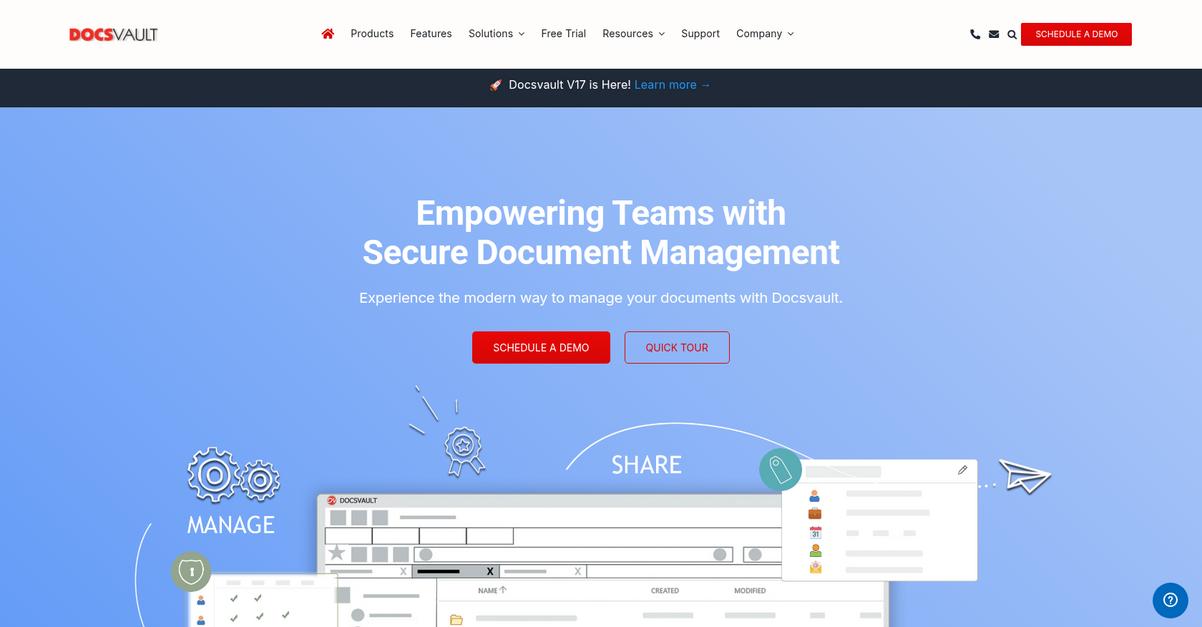
Docsvault takes a single-solution approach focused on delivering truly comprehensive document management. Docsvault features are designed for teams that need core capabilities covering the entire document lifecycle, from capture to compliance and beyond. Here are the five main Docsvault features that address common document headaches and boost productivity across your organization:
1. Integrated Scanning and OCR
Still hunting through stacks of paper files?
If your business relies on paper, finding documents can feel impossible. Physical storage eats up space, and “organized chaos” isn’t a retrieval method.
Docsvault’s scanning feature lets you batch scan documents, assign scan profiles, and capture barcodes—no third-party apps needed. With built-in OCR, your scanned files become fully searchable PDFs. Instantly search for invoice numbers or client names right inside the platform. This Docsvault feature puts digital convenience within reach for every user.

The result? You’ll reclaim time (and storage space), and finally achieve that “paperless office” dream.
2. Workflow Automation
Chasing signatures? That’s a bottleneck you don’t need.
Manual document approval often leads to slow turnarounds, missed deadlines, and human errors—especially when processes aren’t documented or tracked.
With Docsvault’s workflow automation, you can create and tailor digital workflows for tasks like invoice approvals or HR requests. Drag-and-drop design means no coding required to automate reviews, set notifications, or escalate steps. This Docsvault feature ensures that the right tasks reach the right people, on time—every time.
Your team spends less time on process administration and more on real business priorities.
3. Robust Security and Compliance
Worried about unauthorized access to sensitive files?
It’s tough to balance team collaboration with strict regulatory requirements. If you can’t track changes or set granular permissions, you’re risking data breaches or audit headaches.
Docsvault offers multi-level security controls: set user- and group-based permissions, enforce two-factor authentication, and manage document versions. Comprehensive audit trails and retention policies help demonstrate compliance with HIPAA, SOX, or GDPR. This feature keeps your company audit-ready and your documents protected—even as your needs grow.
Peace of mind translates to fewer legal risks and easier compliance audits for your business.
4. Comprehensive Document Management and Organization
Can’t locate files when you need them?
When documents are scattered across emails, desktops, and old servers, finding the right version can be a nightmare. Misfiled or lost information slows everyone down.
Docsvault’s document management tools centralize your content, giving you custom profiles, enterprise search, and unlimited version control for all your files and folders. You can link related documents across locations and apply folder templates for consistency. This feature is all about bringing order to chaos, so nothing falls through the cracks.
The practical side? You’ll accelerate project work, improve team collaboration, and eliminate wasted hours.
5. Integration Capabilities
Frustrated juggling documents across different apps?
Data lives everywhere—CRM, accounting, email. Switching between these silos is inefficient and error-prone, making it difficult to keep information in sync.
Docsvault integrates with third-party solutions using REST APIs and has direct connections to the Microsoft Office Suite. You can pull, save, or edit files from Outlook, Word, or Excel—right from Docsvault. This feature means you’re not locked into one workflow, and your data updates everywhere it needs to.
With everything connected, your business cuts down double entry, streamlines collaboration, and achieves real document control.
Pros & Cons
- ✅ Excellent scanning and OCR for easy digitization
- ✅ Powerful workflow engine reduces manual paperwork
- ✅ Strong compliance controls for regulated industries
- ⚠️ Web interface design feels outdated to some users
- ⚠️ Mobile access app options still somewhat limited
When you combine these Docsvault features, you get a solution where information capture, management, automation, and compliance flow together naturally. Your files, processes, and permissions work in one secure hub, so you spend less time managing documents and more time moving business forward. Let’s look at how this impacts daily operations.
Docsvault Pricing
Is budgeting for document management software confusing you?
Docsvault pricing uses a transparent subscription model, but details aren’t fully published—just a $150/month starting price, with feature breakdowns and user limits behind a sales conversation. That means you’ll want to look beyond the sticker price and dive into an analysis of cost factors, so you truly understand what you’re buying for your budget and what your total monthly outlay might be.
Cost Breakdown
- Base Platform: $150/month starting price
- User Licenses: Custom quote per user
- Implementation: Custom quote
- Integrations: Varies by complexity
- Key Factors: User count, storage needs, features
1. Pricing Model & Cost Factors
Understanding their pricing means doing some homework.
With Docsvault, you get a subscription starting at $150/month, but the real impact depends on user count, features, and storage. User licences and add-ons are custom-quoted, which allows for flexibility but also requires careful scoping. When you plan, focus on these three cost drivers: number of users, storage needs, and integration complexity.
So for your budget, you can avoid surprises by pinpointing requirements and confirming quotes up front.
2. Value Assessment & ROI
Is Docsvault worth the investment?
You’ll pay for core compliance, document security, and all-in-one data control—not just storage. Compared to piecemeal tools, their pricing gives you a security-focused DMS for regulated teams. For organizations that need to meet compliance or document retention mandates, you get cost certainty unlike DIY or scattered solutions.
That means your monthly spend replaces hidden costs and manual drudgery without blowing your IT budget on risky gaps.
3. Budget Planning & Implementation
Don’t let hidden costs trip you up.
Budgeting with Docsvault means factoring in possible setup fees, user-based increases, and integration needs. You’ll want to clarify with sales what’s included (implementation, training, support) so your setup runs smoothly. For total cost of ownership, focus on: up-front implementation, subscription renewals, and periodic feature upgrades.
The result is your monthly costs remain predictable, while you plan for scale without sticker shock.
My Take: Docsvault’s pricing is best suited if you demand high data security, custom compliance, or flexible scale—especially for highly regulated or audit-heavy teams. The approach fits best when you want tailored solutions, not basic flat-fee cloud DMS competition.
With Docsvault, you’re looking at a value-focused, customizable investment. You gain strong security and audit controls for the price, but budget clarity comes from a personalized quote and scoping your needs carefully before signing up.
Docsvault Reviews
Is Docsvault user feedback actually positive?
To give you a clear picture, I’ve analyzed a large sample of Docsvault reviews from verified users on platforms like G2 and Capterra. My focus here is to break down what real customers actually say, so you get an objective view of Docsvault’s strengths and weaknesses.
1. Overall User Satisfaction
Users report high satisfaction rates
When I dig into user ratings, it’s clear that Docsvault consistently earns 4.5 stars or above in most reviews. The overall sentiment is positive, with customers emphasizing both reliability and productivity boosts for their teams. These reviews reflect people using Docsvault to genuinely streamline business workflows, which makes the high scores feel credible.
User satisfaction typically comes from Docsvault’s combination of ease of use, reliable performance, and strong support when needed. Frustrations, when mentioned, are usually about onboarding or remote access.
2. Common Praise Points
Docsvault’s usability wins consistent praise
The feedback I see most often in Docsvault reviews points to how intuitive and straightforward Docsvault is to use. Users regularly mention speedy setup, organized document storage, and how the software simplifies daily work. Praise for customer support, feature completeness, and on-premise security options also comes up frequently in reviews.
For you, this means easy onboarding, few tech headaches, and more time spent on your actual business tasks – a big confidence builder for potential buyers.
3. Frequent Complaints
Initial learning curve gets mentioned often
A recurring theme across reviews is that getting started can require effort for new users. Some customers note that the interface, while powerful, may feel overwhelming at first, and a few call out Docsvault’s “web-only” remote access model as inconvenient.
- ???? Bonus Resource: Speaking of managing important documents, my guide on Microsoft Purview Records Management helps simplify compliance and retention.
For most, these issues are short-lived or minor once users get up to speed. If you need lots of guidance early on, expect a bit of adjustment in the first weeks.
What Customers Say
- Positive: “The software is easy to use and intuitive to set up and maintain. Support is outstanding.” (G2)
- Constructive: “It would be nice if the software client worked remote – you’re stuck in a web browser if you’re working remote, but the browser client is pretty slick!” (G2)
- Bottom Line: “Excellent DMS with a huge amount of features. Great customer service.” (G2)
Bottom line: The feedback has credible depth and consistency across platforms, making Docsvault a strong choice if ease of use and responsive support are top concerns for your business.
In Conclusion
Does Docsvault deliver what your business needs?
Here’s my take: this Docsvault review makes it clear that the software’s value comes from more than just solid features—it’s about the right fit. My verdict pulls together strengths, drawbacks, and best-fit scenarios so you can decide if Docsvault aligns with your team’s needs and expectations.
1. Is Docsvault for you?
Ideal for organizations prioritizing compliance and control.
If your business is a mid-sized company or enterprise needing robust, in-house control over sensitive records, Docsvault stands out. You’ll benefit if your team needs audit-ready workflows, secure scanning, and extensive permission management—especially in regulated fields like finance, healthcare, manufacturing, and public sector roles.
These users succeed because they need true ownership of files, detailed security, and fast support—without the risks or unpredictability of solely cloud-based solutions.
2. Overall Strengths
Reliable security meets comprehensive document control.
Docsvault shines with its broad suite of features, especially workflow automation, advanced scanning, and compliance tools that go beyond typical DMS offerings. Real-world users love the intuitive admin controls, responsive support, and the freedom that comes from on-premise or hybrid hosting options.
These strengths truly matter when your business must organize chaos, go paperless, and gain peace of mind that your files are secure and your workflows are under control.
3. Key Limitations
A few notable trade-offs for some users.
The main drawbacks stem from the opaque pricing model and desktop client caveats. You’ll need to reach out to sales to get custom quotes, which could slow evaluations. For fully remote teams, web-only offsite access might not suit every workflow, despite positive browser client reviews.
Still, these limitations aren’t deal-breakers for most. If you must have instant remote desktop use or transparent public pricing, you may want to consider alternatives.
4. Bottom line?
My recommendation: best for control-focused, compliance-driven teams.
If you’re seeking a mature, feature-rich DMS that prioritizes secure oversight, Docsvault is a smart pick—especially when paperless workflows, regulatory demands, and fast support top your list. Price transparency could improve, but value for the right audience is solid.
Start with a demo or contact sales as your next move; if the needs align, you can feel confident in your decision to choose Docsvault.
Docsvault review shows this is a top choice for teams needing ironclad information control and regulatory readiness—especially when security and ownership top your priorities.
Bottom Line
- Verdict: Recommended
- Best For: Compliance-focused, control-driven organizations
- Business Size: SMBs and enterprises, 10–500+ users
- Biggest Strength: Secure, feature-rich document workflows
- Main Concern: No public pricing, web-only remote client
- Next Step: Book a demo or request a trial