
Tired of drowning in messy receipts?
If you’re exploring small business bookkeeping tools, you’re probably frustrated with manual paperwork, clunky spreadsheets, or software that’s just too complicated for your needs.
The real issue? Wasting precious hours tracking expenses and organizing financial docs, which only adds stress and pulls your focus away from actual business growth.

Neat tackles this by combining automated document management, super-simple bookkeeping, and intuitive tools that are truly built for non-accountants—so you can finally get complete financial visibility without the usual hassle.
In this Neat review, I’ll share how you can save real time and gain peace of mind by using a platform that puts organization and usability first.
You’ll see a breakdown of features, pricing, integrations, and alternatives—giving you everything you need to evaluate if Neat is the right choice for your business.
Walk away knowing exactly which features you need to simplify your bookkeeping and make a confident decision.
Let’s dive into the analysis.
Quick Summary
- Neat is cloud-based software that simplifies financial document management and automates bookkeeping for small businesses.
- Best for small business owners and freelancers needing easy expense tracking and invoice management.
- You’ll appreciate its accurate OCR and mobile capture that reduce manual data entry and streamline organizing receipts.
- Neat offers an annual subscription at $200 with a 14-day free trial requiring a credit card.
Neat Overview
Neat’s core mission is to make financial document management and bookkeeping effortless for small businesses and self-employed professionals, letting you focus on growing your business instead of wrestling with paperwork.
In a crowded field, Neat stands out by designing easy-to-use automated financial organization tools for business owners without accounting expertise. Their solutions are tailored for small businesses, freelancers, and individuals who need an intuitive way to manage receipts, expenses, and business records—all without complicated interfaces or jargon.
Hundreds of thousands of small business owners and solo entrepreneurs trust Neat’s platform, including consultants, retailers, and service companies seeking reliable, straightforward bookkeeping.
- ???? Bonus Resource: If you’re looking for more general productivity solutions, my Dropbox Review on secure file sharing and collaboration for your entire team is a must-read.
Here’s why Neat consistently earns praise:
- Intuitive, all-in-one document capture and financial management
- Strong automation: OCR-driven data entry and real-time bank syncing
- Secure, ISO/IEC 27001-certified cloud platform for compliance and peace of mind
Strategically, Neat is focused on expanding bookkeeping automation, better mobile experiences, and deeper integrations—aligning their direction with the growing demand for simple, adaptable back-office tools.
Let’s dive into this Neat review and see which features might be the best fit for your business.
Neat Features
Too much paperwork and lost receipts draining your energy?
Neat takes a single-solution approach to financial organization, combining document management with automation so you never miss a detail. All the core Neat features are designed to make small business bookkeeping simple—no accounting degree required. Here are the five main Neat features that actually solve those everyday admin headaches:
1. Document and Receipt Management
Receipts piling up in your glove box again?
When you’re constantly losing receipts or drowning in paperwork, tax time turns stressful and expense tracking feels impossible. No more shuffling through piles or wasting time uploading receipts one by one.
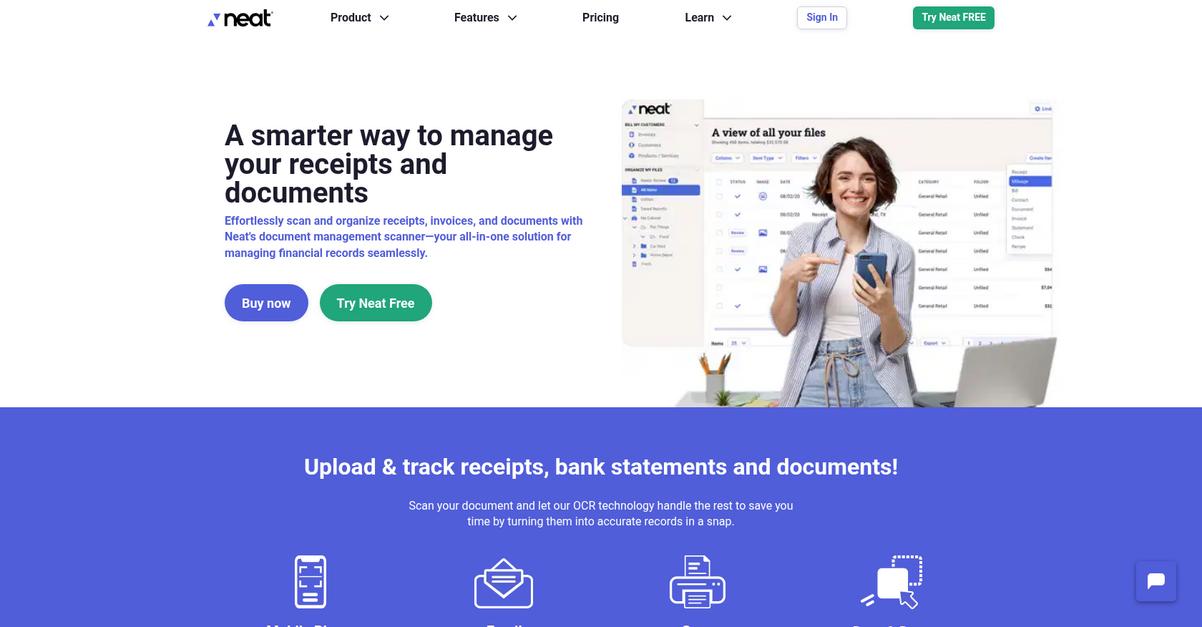
Neat’s document management feature lets you capture receipts via mobile, email, or quick uploads. Its patented OCR instantly extracts key data: vendor, date, amount, and payment type. This makes it genuinely easy to keep everything organized and searchable in a few taps—no more manual sorting.

You get back hours each month; staying audit-ready, streamlining tax prep, and never stressing about supporting documents for your expense claims.
2. Expense Tracking and Financial Management
Worried you’re missing transactions?
Trying to manually track business accounts and categorize every transaction is a nightmare—especially if you’re jumping between apps or spreadsheets. It’s easy for expenses to slip through the cracks.
With Neat’s financial management features, you can link over 10,000 banks and cards so your transactions get pulled in automatically. One-click categorization and auto-matching with uploaded receipts mean you always know where your business money goes. This drastically reduces the risk of missed deductions and wasted spend.
Budgeting’s less overwhelming, and you’re always ready for tax season—no end-of-year panic or missed write-offs.
3. Invoicing
Tired of chasing late payments?
Manually creating and sending invoices is tedious, and tracking whether clients have paid just adds to your stress. That cash flow delay is something you feel every single month.
Neat’s invoicing feature is designed for simplicity: create, send, and track invoices right from your phone or desktop. Send payment reminders with just one tap and monitor status without opening a separate tool. This Neat feature keeps your billing on autopilot, so receivables don’t fall through the cracks.
It helps you get paid faster and reduces the mental overhead of invoice follow-up—more time for actual business.
- ???? Bonus Resource: If you’re also looking into document organization, my guide on digital file finding solutions can simplify your search.
4. Reporting and Insights
Not sure where your business stands financially?
It’s easy to feel lost reviewing spreadsheets or guessing at budgets. You may not catch issues like runaway spending or slow months until it’s too late.
The Neat reporting and Insights area shows your KPIs in easy-to-read charts for net cash flow, expenses, and profits. Instantly highlight trends and opportunities with automated tracking of business health, top expense categories, and more. This feature turns data into useful advice, so you’re never making decisions in a vacuum.
You make smarter choices, spot waste, and confidently steer your business toward growth—without relying on guesswork.
5. Integrations and Customization
Stuck trying to juggle multiple accounting systems?
Switching between tools (like QuickBooks, scanners, or expense apps) wastes your time and risks errors or lost data. Getting everything to “talk” is harder than it should be.
Neat’s integration feature connects to QuickBooks Online and TWAIN scanners, letting you push receipts and transactions straight to your accounting software. Customize how vendors, categories, and items import for a tailored workflow. This Neat feature ensures you don’t have to rebuild your systems from scratch.
You avoid entry errors, save hours on reconciliation, and keep all your books synchronized automatically.
Pros & Cons
- ✅ Receipt scanning and data extraction are highly accurate
- ✅ Real-time bank syncing simplifies ongoing expense tracking
- ✅ QuickBooks integration reduces duplicate manual work
- ⚠️ Limited advanced reporting compared to full accounting suites
- ⚠️ No full payroll or inventory management options
Neat features work in sync, letting you snap, store, track, invoice, and export without ever losing control. This unified workflow means your finances are always accurate—and you always know where your business stands. Let’s explore how Neat fits with broader accounting systems and your existing processes next.
Neat Pricing
How much will Neat actually cost you?
Neat pricing keeps things refreshingly simple for budget-conscious buyers. Instead of juggling multiple plans or confusing add-ons, Neat offers a straightforward annual flat fee and a la carte upgrades if you want extra insights or VIP-level support. Here’s how it breaks down:
| Plan | Price & Features |
|---|---|
| Neat Standard | $200/year (no monthly plan) • Unlimited file storage & data capture • Mobile, web, and desktop access • Expense tracking, filtering, and search • File sharing & collaboration tools |
| VIP Service (Add-On) | +$50/year • Priority help from VIP team • One-on-one training • Enhanced onboarding support |
| Automated Insights (Add-On) | +$150/year • Real-time accounting insights • Automated reports and expense analytics • Customized invoice generation |
1. Value Assessment
Simple pricing can be a strategic win. With Neat, you’ll only pay one flat fee for all core features—plus optional enhancements if you want deeper insights or special support. The value here is predictability; no hidden fees or user limits. For many, Neat pricing eliminates budgeting guesswork, so your actual costs stay clear. You won’t face extra charges for file storage or collaborating with your team.
Budget-wise, you get stability and a predictable annual spend.
- ???? Bonus Resource: While we’re discussing file management, understanding how to unify disconnected cloud files is equally important for efficiency.
2. Trial/Demo Options
You can try Neat before you buy. There’s a 14-day free trial with full access to the standard plan (credit card required). This lets you preview the tools, automation, and support first-hand without paying upfront. When the trial’s over, you’ll pay for the annual plan if you stick around. If Neat isn’t a match before the 14 days are up, just cancel—no annual charge.
Evaluating the actual core features before buying keeps your budget safe.
3. Plan Comparison
Choosing the right Neat option is easy. With just one main plan, plus a couple of specialized add-ons, you choose only what suits your bookkeeping needs. Start with the standard plan; add features like Automated Insights or VIP Service later if your business grows. You skip complex pricing tiers and avoid user-based upgrades.
This matching approach helps you buy only what you actually need.
My Take: Neat nails basic bookkeeping value for small businesses that want simplicity without hidden costs. Their single-plan pricing makes it easy to predict your spend—great if you have a tight budget and hate surprise fees.
When it comes to value, Neat pricing means clarity and cost control. If you want predictable spend, try their two-week trial to see if Neat fits your workflow.
Neat Reviews
Are Neat reviews as helpful as they seem?
To give you an honest picture, I’ve analyzed Neat reviews from small business owners, individual users, and longtime subscribers. I’m factoring in recent user feedback from public sites, app stores, and verified customers to uncover exactly what you can expect from Neat.
1. Overall User Satisfaction
Most users feel Neat makes life easier.
When I dig into overall review patterns, the vast majority of users are satisfied with Neat’s software, highlighting improved organization and less paperwork. Across reviews, user sentiment trends positive with high ratings, especially for recent software versions. Users frequently note that the move from physical scanners to a streamlined cloud app improves both speed and reliability.
Customers say satisfaction comes from Neat’s paperless approach, faster document searches, and reliability for tax time. Most users continue using Neat long term because it reduces headaches and busywork.
2. Common Praise Points
Users love Neat’s ease and organization.
What I see in Neat reviews is consistent praise for how easily the software organizes receipts, scans, and financial documents. Efficient document handling and accurate OCR extraction come up in nearly every positive review. Users share that the mobile app, convenient data capture, and responsive customer support give them real confidence in using Neat for daily and monthly bookkeeping.
For busy small business owners, these features translate into real-world time savings and less hassle. You can expect better control over your records and less stress during tax season.
- ???? Bonus Resource: Speaking of efficient workflow, exploring alternatives for cloud file syncing can further optimize your digital document management.
3. Frequent Complaints
Compatibility issues frustrate some long-time users.
Looking at negative reviews, the most frequent complaints involve discontinued support for older Neat scanners and changes to legacy software. Reports of lost scanner support and forced upgrades stand out among long-term users. While most recent feedback focuses on the software, some still vent about hardware being made obsolete, especially after updating operating systems.
For you, these complaints may matter only if you rely on old Neat hardware; otherwise, most issues are specific to past versions and don’t affect the current service.
What Customers Say
- Positive: “It makes budgeting, tax preparation and documentation on my spending so easy.” (Patricia M., Trustpilot)
- Constructive: “They abandoned the functionality of the scanner when Apple came out with Ventura (OS 13.6)…” (Susan D., Trustpilot)
- Bottom Line: “It’s simple, useful, effective, and saves time every month.” (User review, GetApp)
Overall, you’ll find Neat reviews repeatedly highlight organization, efficiency, and responsive support. My analysis is based on real customer voices, so you can decide confidently if Neat fits your workflow.
In Conclusion
Is paperless bookkeeping your top priority?
Here’s my take: This Neat review points to a software purpose-built for small businesses, freelancers, and solos looking to gain control over receipts and expenses while eliminating paperwork headaches. I’m giving you my clear, confident recommendation based on usability, user feedback, and practical fit analysis.
1. Is Neat for you?
Perfect for small business owners and solos
If your business struggles with overwhelming paper receipts or needs a straightforward way to track spending and organize documents, Neat is built for you. It’s best for non-accountants—solo founders, growing consultancies, freelancers, and service pros—who want an easy entry point into digital bookkeeping without the complexity of enterprise accounting.
You’ll thrive with Neat if you value fast setup, time saved on manual entry, and a focus on organized, audit-ready records without hiring outside help.
2. Overall Strengths
Consistently excellent at document management
What stands out from my review is Neat’s accurate OCR-powered receipt capture and versatile document organization. The platform excels at digitizing, storing, and categorizing receipts and invoices, with handy features like mobile capture and real-time reporting. Annual pricing is competitive for the features delivered, especially with best-in-class support and frequent product updates.
For your business, these strengths mean less manual labor, simpler tax prep, and far better visibility into your finances—without drowning in paperwork.
3. Key Limitations
Not a full accounting replacement
Neat’s biggest trade-off is its narrower focus on expense management and document capture. It doesn’t provide full ledger accounting, payroll, or inventory, and older scanner hardware support is limited. The annual-only billing plan may deter some, and deeper accounting integrations aren’t as robust as with full-suite platforms.
For most, these limitations aren’t deal-breakers—they’re manageable if you want simplicity, but you’ll need an add-on if your needs go beyond streamlined document tracking.
4. Bottom line?
I recommend Neat for simple bookkeeping
Based on my complete Neat review, you should choose this software if you’re a small business, freelancer, or solopreneur aiming to ditch paper, automate expense tracking, and stay audit-ready. If your needs are advanced or you require payroll, look elsewhere—but for streamlined receipt management, this software delivers big.
My advice: Grab a trial or demo to see how Neat’s workflow fits your daily paperwork pain and give your financial admin a real productivity boost.
Wrapping up this Neat review—if you need to automate, simplify, and organize your business receipts effortlessly, you’ll appreciate what Neat brings to the table.
Bottom Line
- Verdict: Recommended
- Best For: Small businesses, solos, and freelancers
- Business Size: 1-10 employees, no dedicated bookkeeper
- Biggest Strength: Accurate OCR receipt capture & organization
- Main Concern: Not a full accounting replacement
- Next Step: Start a free trial to test fit