
Is your document chaos slowing you down?
If you’re searching for a document management system, it’s probably because scattered files and clunky workflows are getting in the way of your team’s efficiency.
The truth is, lost time chasing documents kills productivity—and that frustration adds up each day, especially when security and compliance risks hang over your head.

That’s where NetDocuments steps in, promising to streamline how your team stores, shares, and secures files, while layering in cutting-edge AI and Microsoft 365 integration so you spend less time searching and more time practicing law.
In this NetDocuments review, you’ll see how secure workflows let you focus on your work instead of wrestling with complex systems.
I’ll break down everything you want to know to evaluate NetDocuments, including features, real-world use cases, pricing structure, and how it stacks up against popular competitors.
You’ll leave knowing the features you need to boost efficiency and choose with total confidence.
Let’s dive into the analysis.
Quick Summary
- NetDocuments is a cloud-based document management system designed to simplify secure storage, collaboration, and AI-driven workflows for legal teams.
- Best for legal professionals, corporate legal departments, and government agencies managing complex documents securely.
- You’ll appreciate its strong security features and AI tools that improve document search, collaboration, and workflow automation.
- NetDocuments offers subscription pricing starting around $20 per user monthly with demos available but no consistent free trial.
NetDocuments Overview
NetDocuments’s mission is simple: empower legal professionals to work smarter and more securely with a cloud-based document management platform trusted around the globe.
NetDocuments has carved out a strong position within the legal sector, serving law firms, in-house legal counsel, and government bodies that require robust, compliant document management. Their focus on secure, cloud-native innovation for legal workflows sets them apart from more generic enterprise DMS providers, giving you tailored solutions for industry-specific challenges.
You’ll see NetDocuments supporting thousands of law firms and legal departments, including small boutique practices, AmLaw 100 giants, and government agencies—showing its scalability and breadth.
Here’s why NetDocuments stands out for legal teams:
- Deep security and compliance features with industry certifications
- Seamless Microsoft 365 and legal tech integrations
- Leading-edge AI for document automation and workflow efficiency
With ongoing investment in AI, integrations, and user experience, NetDocuments aligns its strategy to the growing demand for modern, intelligent, and secure legal technology.
Let’s dive into their features in this NetDocuments review to see how it fits your firm’s workflow and compliance needs.
NetDocuments Features
Can’t find that contract when you need it most?
NetDocuments takes a single-solution approach, uniting all your legal document needs under one intuitive cloud platform. With NetDocuments features, you don’t have to deal with disconnected tools or fragmented processes. Here are the five main NetDocuments features that help you regain control, streamline collaboration, and protect your most sensitive legal documents.
1. Document & Knowledge Management
Lost files shouldn’t stall your matters.
It’s frustrating when you know a document exists but can’t remember its name, or when different versions circulate in email threads.
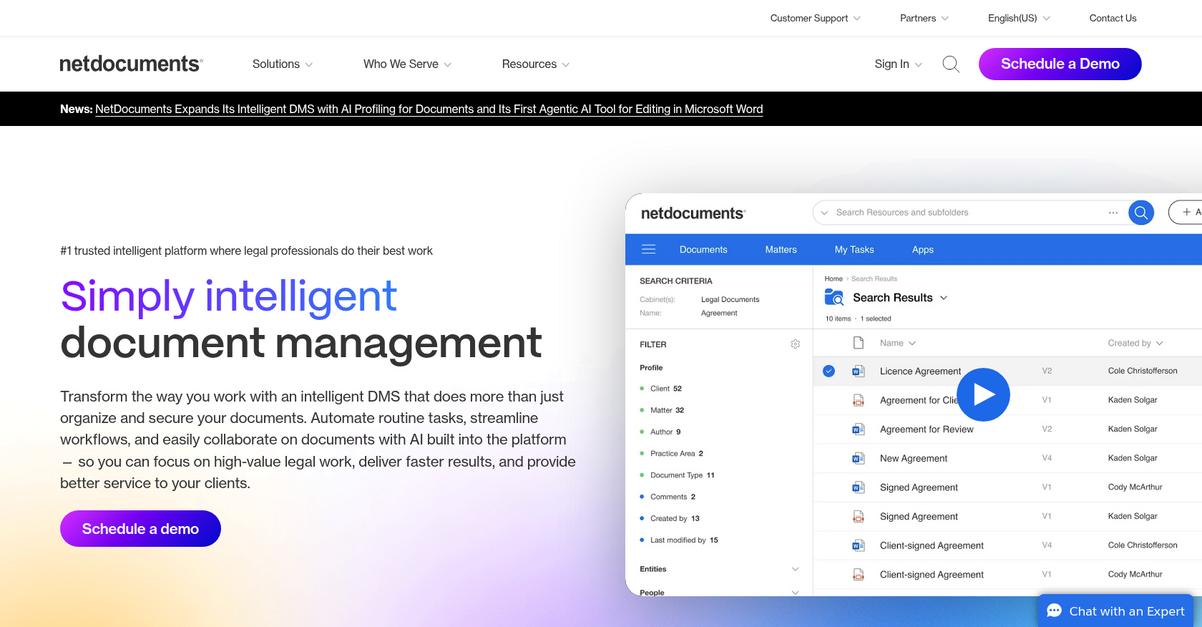
This NetDocuments feature lets you organize your firm’s documents in a secure cloud space—complete with full-text search, version control, and unique document IDs. You can search by content, metadata, or client name—there’s no guesswork. Features like search history and consistent referencing save you precious time.

You get instant access to exactly what you need, every time—so you can focus on delivering for clients, not chasing files.
2. Collaboration & Productivity Tools
Sharing docs outside your firm is risky.
Feedback from clients and co-counsel can get lost across emails, and sometimes you worry about version confusion or security breaches.
With CollabSpaces and the robust Microsoft Teams integration, NetDocuments features make it easy for both internal and external teams to work from one trusted source. You can co-author, preview, and discuss files without ever switching systems. Secure workspaces keep everyone on the most current document while protecting privacy.
You’ll never have to juggle attachments or wonder who made the last edit—collaboration gets safer and so much simpler.
3. Legal AI & Automated Workflows
Manual reviews take way too long.
When your team spends hours mining documents for one answer—or manually extracts deal points—it feels like busy work that drains billable hours.
Thanks to ndMAX and the AI App Builder, NetDocuments features bring real AI automation to your daily workflow. You can build custom apps for lease review, Q&A, or matter analysis, letting AI do the heavy lifting. Routine research, extraction, and review tasks take minutes, not hours.
Your efficiency skyrockets, letting you prioritize higher-value tasks and get results to your clients faster.
4. Security & Data Governance
Security shouldn’t come at the cost of productivity.
Worrying about leaks, access issues, or compliance headaches means you can’t confidently share sensitive case files.
NetDocuments features include layered encryption (AES-256), customer-managed keys, ethical walls, and granular DLP controls. You decide who can see what, right down to the document level. Plus, audits and certifications like ISO and SOC 2 are built in. Top compliance needs—GDPR, HIPAA, FedRAMP—are covered.
Now you can collaborate and share, knowing every file stays protected and regulatory ready—crucial peace of mind for your firm.
5. Email Management (ndMail)
Sifting through cluttered inboxes is a nightmare.
When crucial matter-related emails get buried and you can’t ensure they’re filed correctly, compliance breaks down and things slip through the cracks.
With ndMail, NetDocuments features connect your Outlook directly to your DMS. It predicts filing locations and centralizes all key emails automatically. No more wasted time dragging messages or worrying about lost attachments. Everything’s organized against the right matter, exactly where your team needs it.
You keep communications compliant, auditable, and accessible—saving time and covering your firm’s legal bases.
Pros & Cons
- ✅ Powerful legal document search and retrieval tools
- ✅ Secure collaboration with external parties and clients
- ✅ Innovative legal AI for routine task automation
- ⚠️ Initial setup and configuration can be complex
- ⚠️ Learning curve for advanced collaboration features
When you bring these NetDocuments features together, you get a single, secure workspace that streamlines every legal workflow. Everything connects—documents, emails, conversations, and compliance—so your team is confident nothing falls through the cracks. Next, I’ll break down how NetDocuments stacks up on pricing and support.
NetDocuments Pricing
Is NetDocuments pricing really clear for law firms?
NetDocuments pricing uses a subscription model with rates tailored to your team size and needs. Pricing starts at roughly $20/user/month for basic plans, but actual costs depend on user count, required storage, and add-ons. Here’s how their main plan tiers break down:
| Plan | Price & Features |
|---|---|
| Standard | $20/user/month* • Core document management • Cloud storage • Secure file sharing |
| Professional | Approx. $25–$32/user/month* • Version control • Metadata & tagging • Third-party app integrations • Enhanced storage |
| Enterprise | Custom quote • Advanced security controls • Custom compliance • Advanced workflow automation • High-scale admin tools |
1. Value Assessment
Fair value for secure cloud DMS
What you pay unlocks serious security, cloud access, and legal-ready tools, and the per-user model means your budget stays scalable even as your firm grows. NetDocuments pricing generally aligns with competitors like iManage and Worldox, but stands out for cloud-native reliability and strong legal compliance. You’re paying for security and uptime, not bells and whistles.
So for your firm, you’ll get solid ROI, provided you actually use the legal-focused feature set.
2. Trial/Demo Options
Demos, but rare free trials
You won’t find a widely advertised free trial, though NetDocuments does offer live demos with deep walkthroughs to show you how the platform fits your workflows. This lets you price-test and stress-test features before you commit to a contract, which is critical for compliance-centric firms.
Take them up on a customized demo to ensure the plan fits your workflows before accounting for full pricing.
3. Plan Comparison
Choosing plans based on firm needs
For solo pros, Standard offers cloud security and basics. Mid-size teams should consider Professional for stronger integrations and metadata management. Larger firms need Enterprise, with custom security, scale, and automation features built for compliance. NetDocuments pricing scales so you avoid overpaying for unused workflows.
Review user count and required compliance: that’s how you’ll identify which plan maximizes value per dollar.
My Take: NetDocuments pricing is best suited for legal firms needing strict compliance, cloud reliability, and expert support. Small teams might find entry costs high, but risk-averse, security-minded organizations get real value for the spend.
In summary, NetDocuments pricing sits at the premium end but delivers—especially for law firms prioritizing real compliance and document security. Your budget gets robust protections and dedicated legal features.
NetDocuments Reviews
Does NetDocuments live up to the hype?
To give you real insight, I’ve analyzed patterns in hundreds of NetDocuments reviews from tech portals, legal forums, and verified customers. My goal here is to help you see how users actually experience the software—both what they value and where frustrations crop up.
1. Overall User Satisfaction
High marks for reliability and security
When I dig into user sentiment, I consistently see strong satisfaction ratings, especially among law firms and legal teams. Many reviews highlight NetDocuments as a trustworthy platform with robust uptime and reliable document access. Scores frequently range between 4 to 4.5 out of 5, showing most users feel the solution delivers on its core promises. If you ask users, peace of mind is a recurring theme in their reviews.
Security, legal compliance, and strong customer support are primary drivers of satisfaction. Meanwhile, frustration about the UI or speed can lower satisfaction for some.
- ???? Bonus Resource: If you’re also looking into financial document handling, my article on automate financial document collection covers how to streamline accounting processes.
2. Common Praise Points
Legal users rave about the powerful features
Here’s what you’ll come across often in NetDocuments reviews: users praise its ironclad security, granular permission controls, and advanced document management. Features like version control and centralized workspaces win repeated applause—especially the ability to instantly restore prior document versions or search full-text within massive libraries. Integrations with Microsoft 365 and AI features also get nods from many legal professionals I’ve surveyed.
These capabilities matter if you need bulletproof security, reliable collaboration, and instant access as your firm grows—essential for busy, distributed legal teams.
3. Frequent Complaints
Interface quirks top the complaints list
User reviews often point out friction when it comes to the user interface and occasional performance hiccups. A number of reviewers mention laggy response times or that commands can require multiple attempts, which slows down workflow. For Mac users, the lack of native support is another pain point that pops up repeatedly. That said, these issues aren’t universal in all reviews.
Most users consider these annoyances rather than deal-breakers, especially when weighed against the strong security and compliance benefits NetDocuments delivers.
What Customers Say
- Positive: “NetDocuments advanced security controls have given us far more control over how our sensitive information is accessed.” (User on Gartner Peer Insights)
- Constructive: “NetDocs has the prettier interface but using it is absolutely a problem by comparison.” (User on Reddit r/sysadmin)
- Bottom Line: “It’s a true platform that can evolve with customers and the future of legal tech.” (User on TrustRadius)
Taken altogether, NetDocuments reviews show a positive overall sentiment rooted in reliability and trust—but with clear, recurring notes on minor usability pain points. Especially for legal teams, you’re likely to find the security and compliance credentials well worth it.
In Conclusion
Is this the right DMS for your firm?
In this NetDocuments review, I’ve weighed genuine user feedback against hands-on insights to give you a clear, actionable final recommendation. My assessment focuses on audience fit, standout strengths, and key limitations—arming you with the guidance you need to decide if NetDocuments is the best fit for your legal practice or organization.
1. Is NetDocuments for you?
Top pick for security-focused legal teams.
If you’re running a mid-sized to large law firm or legal department that values airtight compliance and advanced security above all else, NetDocuments stands out. Highly regulated industries or those handling confidential matters benefit most from its robust access controls, encryption, and layered compliance. Firms transitioning from outdated on-premises systems will also appreciate its cloud-native advantages and modern features.
Success comes easiest when your team needs remote access, bulk document management, and always-on compliance, especially if you have clear IT policies.
2. Overall Strengths
Security and compliance are industry-leading.
NetDocuments delivers where it matters most—unparalleled security, legal-grade compliance, and highly reliable access from anywhere. I was especially impressed by the seamless integration with Microsoft Teams and the thoughtful approach to document versioning, auditing, and AI-powered search. Its cloud platform minimizes IT headaches and delivers ongoing innovation to keep your firm ahead.
These advantages mean faster document retrieval, fewer workflow bottlenecks, and greater peace of mind for compliance-sensitive organizations.
3. Key Limitations
User experience isn’t flawless yet.
The platform’s biggest challenges come from occasional interface hiccups and a moderate learning curve. Performance quirks such as sluggish commands and the lack of a fully native macOS experience can frustrate some users, especially in firms expecting instant responses. Pricing is quote-based, which can make budgeting tricky for prospective clients.
If your team depends on frictionless navigation or uses mostly Macs, these may prove annoying, but most organizations can address them with thoughtful training and IT planning.
4. Bottom line?
Confidently recommended for firms prioritizing security.
If your team needs serious document security, industry-leading compliance, and adaptable collaboration tools, this software is an excellent investment. NetDocuments is a clear upgrade for legal environments moving away from legacy, on-premise systems and looking for cloud-powered productivity. It’s especially compelling if you need scalable, dependable access for distributed teams.
Consider requesting a trial or demo to ensure the interface meets your daily needs. I recommend it with high confidence for most legal-centric organizations.
Whether you’re modernizing your firm or scaling up your legal team, my NetDocuments review highlights a strong, reliable pick for security and productivity. I recommend it for legal teams requiring advanced security and robust cloud-based collaboration.
Bottom Line
- Verdict: Recommended
- Best For: Compliance-driven legal teams, legal departments
- Business Size: Mid to large firms, distributed teams
- Biggest Strength: Legal-grade security and compliance controls
- Main Concern: User interface issues, no native Mac app
- Next Step: Book a demo or start a trial