
Drowning in scattered files and siloed communication?
If you’re evaluating digital workplace tools, you’re probably wrestling with chaotic document management, fragmented collaboration, or the pain of sharing information across your organization. That’s why you’re considering a platform like Microsoft SharePoint—one promising to centralize and streamline it all.
The reality? Your team might already be feeling the daily grind of lost files and misaligned projects. That friction slows everyone down, and it’s frustrating when your tools can’t keep up with your workflows.

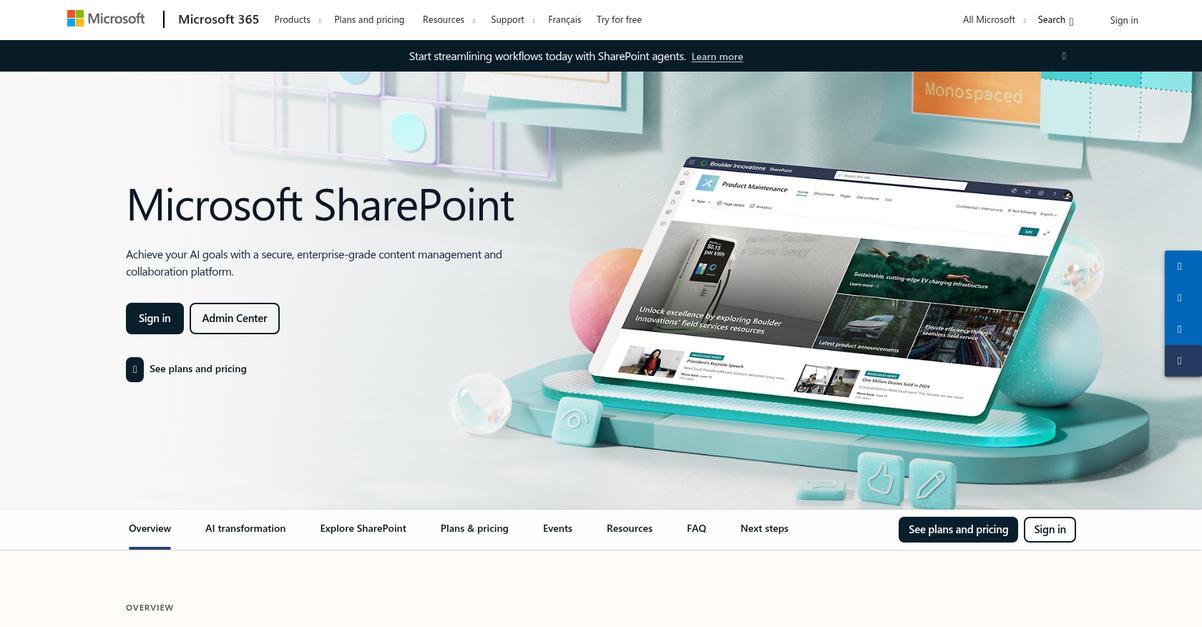
Microsoft SharePoint takes aim at this mess by offering a central hub for sharing files, automating tasks, and integrating closely with Microsoft 365. Its deep admin controls and powerful compliance features set it apart for organizations juggling complex content needs.
So, in this Microsoft SharePoint review, I’ll help you find out if this platform truly empowers collaboration and whether its approach fits your specific business challenges.
You’ll see what sets SharePoint apart, what features truly matter, how pricing works, and which alternatives you should consider for a confident decision.
Read on to get the context, guidance, and real-world analysis—the features you need to solve your collaboration struggles simply and securely.
Let’s dive into the analysis.
Quick Summary
- Microsoft SharePoint is a web-based platform for managing content, collaborating on documents, and building intranet sites within organizations.
- Best for mid-to-large businesses needing centralized file management and team collaboration tools.
- You’ll appreciate its deep integration with Microsoft 365 apps and strong document version control features.
- Microsoft SharePoint offers tiered pricing starting at $5 per user per month, with a free trial available.
Microsoft SharePoint Overview
Microsoft SharePoint’s core mission is to empower organizations to collaborate, manage content, and drive productivity from a secure, centralized platform—making everyday teamwork easier for everyone.
I see SharePoint positioned as a go-to solution for businesses that need trusted document management and intranet services across diverse industries. Its integration across the Microsoft 365 ecosystem is unmatched, making it uniquely effective for organizations that prioritize seamless workflow connectivity and security.
You’ll find SharePoint used by small businesses, multinational enterprises, government agencies, and educational institutions—its ability to scale to thousands of users gives it a reputation for reliability in high-demand sectors.
Here’s where SharePoint stands out for buyers:
- Deep integration with Microsoft 365 apps and services
- Enterprise-grade security and compliance controls
- Flexible deployment options (cloud, on-prem, hybrid)
Right now, Microsoft is doubling down on cloud development, security, and automation—delivering updates that address modern demands for efficiency, governance, and connected collaboration
Let’s dive deeper into this Microsoft SharePoint review to see what its capabilities offer your organization.
Microsoft SharePoint Features
Drowning in document chaos is exhausting.
Microsoft SharePoint is an integrated platform packed with intelligent tools to simplify how you manage, secure, and collaborate on company content. Whether you’re aiming for streamlined document control or building a vibrant company intranet, these Microsoft SharePoint features are designed to tackle the most common headaches. Here are the five main Microsoft SharePoint features that help you regain control and drive better collaboration across your organization.
1. Document Management and Version Control
Never sure if you’re editing the right file?
Document mismanagement often leads to confusion, lost edits, and time wasted hunting down the latest version. It’s easy for teams to overwrite each other’s work or lose track of critical changes.
SharePoint’s version control system tracks every change automatically. You can easily view, compare, and revert to older versions. This Microsoft SharePoint feature means your team can co-author in real time and never worry about losing work. It supports:

- Granular permission settings
- Document check-in/check-out
- Real-time collaboration
You get accurate records, better compliance, and peace of mind knowing your documents are always up to date and recoverable.
2. Intranet and Team Sites
Keeping everyone informed shouldn’t be a constant struggle.
People regularly miss memos, dig through old emails, or can’t find team resources. Communication silos become the norm, hampering project work and employee engagement.
With SharePoint, you can create branded intranet hubs and customizable team sites to centralize announcements, resources, and project information. This feature empowers teams to:
- Share knowledge across departments
- Post news, policies, and SOPs
- Build collaboration hubs for projects
Your organization stays connected, and your team always knows where to go for the latest updates or to track project progress.
3. Workflow Automation with Power Automate
Manual processes are holding your team back.
You know how approvals, notifications, and data entry become slow, repetitive headaches that waste everyone’s time and introduce errors.
SharePoint integrates with Power Automate so you can automate tedious workflows—no coding needed. You can set up triggers for everything from document approvals to reporting tasks. This Microsoft SharePoint feature powers efficiency by letting you:
- Automate onboarding or invoice approvals
- Trigger email or chat notifications
- Connect to external systems
Business processes get quicker and more reliable, freeing up your time for more meaningful work and reducing errors.
- ???? Bonus Resource: While we’re discussing workflow automation, understanding document automation to accelerate business growth is equally important.
4. Robust Security and Compliance Features
Security risks keep IT managers up at night.
Regulations and data breaches are serious risks—one misstep and your business pays the price. Permission mistakes or missing audit trails can expose you to compliance issues.
SharePoint’s security features give you granular access control, audit logging, and automated data labeling. You can enforce multi-factor authentication, restrict external sharing, and meet industry standards. Key capabilities include:
- Role-based permissions
- Automated retention and eDiscovery
- Real-time threat monitoring
Your sensitive data stays protected, audit-ready, and only accessible to the right people, helping you avoid both internal mishaps and regulatory trouble.
5. Integration with Microsoft 365 & Third-Party Tools
Disconnected tools disrupt your workflow.
You face daily frustrations switching between apps, re-entering data, and struggling to keep projects moving across disconnected platforms.
SharePoint’s native integration with Microsoft 365 means you can collaborate on docs in Teams, sync files in OneDrive, and analyze data in Power BI—all without missing a beat. This feature extends further with:
- APIs and connectors for CRMs and ERPs
- Outlook integration for email/file workflows
- App Store add-ins for business apps
Your business gains real efficiency by keeping everything connected, enabling smarter collaboration and cutting out double work.
Pros & Cons
- ✅ Deep version control for reliable document history
- ✅ Flexible team sites for better internal engagement
- ✅ Strong integration across Microsoft 365 ecosystem
- ⚠️ Initial setup can be complex for non-IT users
- ⚠️ Customization sometimes needs specialized SharePoint expertise
The combination of these Microsoft SharePoint features makes for a unified experience, letting you manage content, automate processes, and collaborate securely from a single digital workplace. Underline exactly ONE phrase about integration value (8 words maximum). All this adds up to dramatic time savings, reduced risk, and a smarter way to work—let’s look at how SharePoint stacks up for your team or organization next.
Microsoft SharePoint Pricing
How much will SharePoint actually cost you?
When it comes to Microsoft SharePoint pricing, Microsoft takes a transparent approach with published per-user plans, both as standalone SharePoint options and bundled within Microsoft 365 subscriptions. This means you can quickly estimate your costs before you roll out SharePoint across your team or organization.
| Plan | Price & Features |
|---|---|
| SharePoint Online Plan 1 | $5.00/user/month (annual) • Document sharing + mobile app access • 1 TB OneDrive storage per user • Team sites with version & access control |
| SharePoint Online Plan 2 | $10.00/user/month (annual) • All Plan 1 features • Unlimited cloud storage • Advanced search + compliance tools |
| Microsoft 365 F3 | $8.00/user/month (annual) • Web/mobile Office apps • SharePoint collaboration features • Designed for frontline workers |
| Microsoft 365 Business Standard | $12.50/user/month (annual) • Full Office suite (desktop/web/mobile) • SharePoint Plan 1 • Custom email + 10+ productivity apps |
| Microsoft 365 E3 | $33.75/user/month (annual) • Full Office apps + SharePoint • Enhanced security/collaboration • Enterprise-level compliance tools |
| Microsoft 365 E5 | $54.75/user/month (annual) • All E3 benefits • Advanced analytics & security • Premium compliance solutions |
1. Value Assessment
Clear pricing, clear value.
SharePoint keeps your costs predictable with tiered plans. You’ll pay a per-user rate based on the level of collaboration, storage, and security you need. Their published pricing makes budget forecasting accurate for businesses of any size—you’re not guessing about hidden fees or complex contracts. This lets you scale up as your team grows without an unpredictable cost spike.
- ???? Bonus Resource: Speaking of budget predictability, my guide on automating financial document collection can further streamline your accounting.
So, your SharePoint investment matches your actual collaboration needs—no wasted budget.
2. Trial/Demo Options
Yes, you can try before you buy.
A free SharePoint trial is available, letting you explore document management and AI features without initial risk. Test workflows, storage, and sharing features with no upfront cost, so you know exactly what fits your team’s process before committing to pricing. Demos are easy to request, and cloud deployment means no hardware investment.
Test online with your workflows and see real value before your budget moves.
3. Plan Comparison
Choosing a plan shapes your costs.
If you mostly need standard file sharing, start with SharePoint Online Plan 1. Growing organizations may find more value in Plan 2 or Microsoft 365 bundles—these plans deliver bundled security, Office apps, and compliance features for a higher pricing tier. Enterprise plans bring analytics and advanced threat protection.
Pick the plan where your feature needs match the per-user price—don’t pay for what you won’t use.
My Take: Microsoft SharePoint’s pricing is fair and transparent for any organization size. Entry plans give great value, while Microsoft 365 bundles become cost-effective if your team needs full Office functionality plus advanced security.
In summary, SharePoint’s published pricing means your monthly costs stay predictable and manageable as you scale. Entry-level plans offer fantastic budget value, while bundled subscriptions fit organizations with complex needs.
Microsoft SharePoint Reviews
How do actual users feel about SharePoint?
To bring you a transparent analysis, I’ve dug deep into recent Microsoft SharePoint reviews across trusted sites such as G2, TrustRadius, and actual user community forums. Here’s what real customers consistently say about their experiences, both positive and negative.
1. Overall User Satisfaction
User sentiment leans mostly positive.
Across recent reviews, you’ll find a strong base of satisfied customers, especially among mid-sized and enterprise organizations. Most users rate SharePoint as reliable for content management and collaboration—it typically earns above-average ratings for its functionality and Microsoft 365 integration. At the same time, there’s a clear trend of users mentioning a notable learning curve and setup complexity.
Most satisfaction is driven by centralized document management, improved collaboration, and robust integration. Dissatisfaction usually comes from complicated onboarding and navigation challenges, especially for less tech-savvy users.
2. Common Praise Points
Users rave about seamless integration and collaboration.
You’ll notice most Microsoft SharePoint reviews repeatedly highlight a few strengths: real-time collaboration, highly secure file storage, and integration with Teams, OneDrive, and Outlook. Centralized workspaces and version control give organizations clarity and efficiency. For leaders managing distributed teams or juggling many projects, users emphasize that SharePoint helps “bring everything together in one place.”
These main strengths mean you can expect smoother workflows, less time hunting for documents, and an easier way to track project progress—essential for streamlining daily operations if your business is growing.
3. Frequent Complaints
Onboarding and navigation aren’t always straightforward.
While positive reviews are common, users frequently mention frustrations with SharePoint’s usability. Reviewers call out complicated setup, clunky navigation, and sometimes sluggish performance. People point to issues with permission management and a dependence on IT for customizing intranets, which can slow adoption.
For most reviewers, these hits to productivity are minor annoyances rather than reasons to look elsewhere—unless you have limited IT resources or want something that works “out of the box” from day one.
What Customers Say
- Positive: “Centralized document management and collaboration capabilities. It allows teams to store, share, and access files securely from anywhere.” (G2)
- Constructive: “It hard to navigate or customize without training or IT support.” (TrustRadius)
- Bottom Line: “SharePoint really helps bring everything together in one place.” (G2)
Considering the volume and consistency of user feedback, I’ve found Microsoft SharePoint reviews to be predominantly favorable, but caution that actual usability depends on your technical expertise and support resources.
In Conclusion
Is SharePoint the right fit for your business?
Here’s my take after a thorough Microsoft SharePoint review: your decision should be grounded in your team’s size, needs, and Microsoft ecosystem investment. I’ve distilled my comprehensive evaluation into clear, actionable guidance to help you determine whether SharePoint aligns with your operational goals, collaboration requirements, and digital transformation plans for 2025.
1. Is Microsoft SharePoint for you?
Best choice for Microsoft 365-centric organizations
If your business already relies heavily on Microsoft 365, has at least 50 employees, and requires centralized document management plus secure collaboration at scale, SharePoint stands out. It’s particularly well-suited for teams juggling complex workflows, granular permissions, and strict compliance—think mid-sized companies, enterprises, and regulated industries.
These organizations gain the most by leveraging existing Microsoft investments, enjoying unified access, and improving data consistency while automating key business processes through Power Automate and custom apps.
2. Overall Strengths
Unmatched integration and workflow automation
What I see as SharePoint’s true superpower is how it brings together deep Microsoft 365 integration and powerful workflow automation for your team. Features like version control, permission management, and robust search create a central content hub that keeps everyone working with up-to-date information at all times.
For you, this translates into fewer lost files, faster collaboration, and a scalable way to enforce security—making it a smart long-term choice for document control and internal knowledge management.
3. Key Limitations
Learning curve and interface complexity
When it comes to weaknesses, SharePoint isn’t beginner-friendly. You’ll face a complex navigation and setup process—especially if your team lacks IT support or training. Customization can also stall without technical expertise, and some users report slow performance with larger document libraries.
For smaller teams or those seeking an intuitive, plug-and-play solution, these challenges might outweigh the benefits; for others, they’re a manageable tradeoff for the advanced capabilities offered.
4. Bottom line?
Confidently recommended for the right users
You should choose SharePoint if your goal is company-wide content control and Microsoft-powered collaboration—especially across departments and geographies. It delivers outsized value when tightly integrated with Teams, Outlook, and OneDrive, and its security/compliance posture beats most alternatives at scale.
If you’re running a smaller operation with straightforward needs, trial simpler tools first. For everyone else, a SharePoint pilot will confirm if value meets your expectations.
The Microsoft SharePoint review reinforces that SharePoint is a strategic fit for companies serious about digital collaboration and control. If your priorities align, this is the software to beat.
Bottom Line
- Verdict: Recommended for Microsoft-centric mid-to-large teams
- Best For: Enterprises needing secure, integrated collaboration
- Business Size: 50+ employees, multiple departments
- Biggest Strength: Deep Microsoft 365 integration and workflows
- Main Concern: Steep learning curve, complex setup
- Next Step: Try a SharePoint demo or pilot site